🏆 Bot Club, $9/mo: new copy-paste bot recipes and ready-made templates every month, plus a monthly “get unstuck” Q&A post in the members area. Cancel anytime.
Join Bot ClubWhy do the FAFSA now (even if college feels far away)
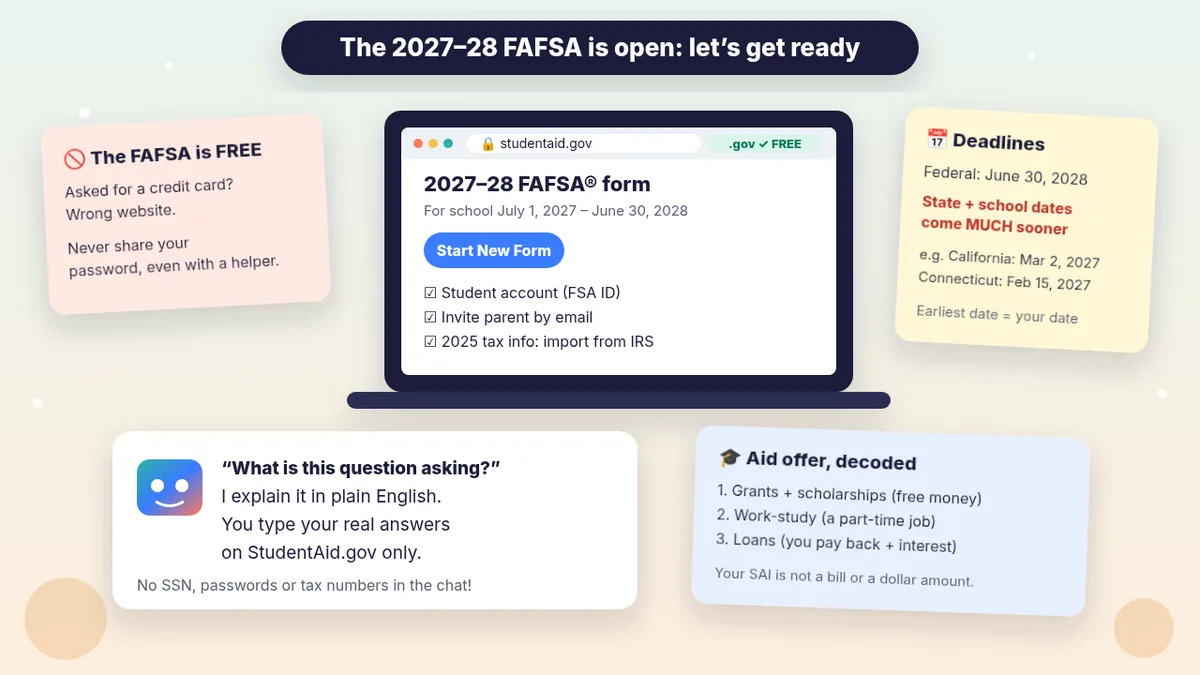
The FAFSA (Free Application for Federal Student Aid) is the form colleges and career schools use to work out how much aid you can get: grants (money you usually don’t pay back), work-study (a part-time job to help pay for school), scholarships and loans (money you borrow and repay with interest). StudentAid.gov says any student, regardless of income, who wants to be considered for federal, state or school aid should fill it out, and you have to apply every year.
The 2027–28 form is available now. Use it for school between July 1, 2027 and June 30, 2028 (for example, a high school senior starting college in fall 2027). Use the 2026–27 form for school between July 1, 2026 and June 30, 2027.
Don’t wait for the federal deadline. The federal deadline is 11:59 p.m. Central time, June 30, 2028, but StudentAid.gov warns that some state and school aid is limited, and each state and school sets its own date. A few examples from StudentAid.gov’s 2027–28 list: California, most state aid by March 2, 2027; Connecticut, priority by Feb. 15, 2027; Florida, May 15, 2027; Georgia, as soon as possible after Oct. 1, 2026. Look up your state on the FAFSA deadlines page and ask each school for theirs.
What you need before you start
StudentAid.gov lists three things:
- A StudentAid.gov account (FSA ID) for the student, and a separate one for each parent or spouse who has to add information. To make one you give your name (exactly as it appears on your Social Security card, if you have one), date of birth, email address and Social Security number (if you have one).
- Your parent’s or spouse’s email address, so you can invite them to your form.
- Income and asset information, if your form asks for it.
Good news: StudentAid.gov says you can start, and usually finish, without digging out documents, because most people import their federal tax information directly from the IRS. If the form needs a document, it tells you. Things you might need: tax returns, records of child support received, current savings and checking balances, cash if it’s more than $1,000, and the value (and debt) of non-retirement investments, businesses and farms. Keep those records; don’t mail them in.
Who counts as “parent”? For a dependent student it’s your legal (biological or adoptive) parent. Grandparents, foster parents, legal guardians, aunts, uncles and older siblings are not your parents for the FAFSA unless they adopted you. If your parents are divorced, separated or never married and don’t live together, it’s usually the parent who gave more financial support in the last 12 months. StudentAid.gov’s Reporting Parent Information page and its “Who’s My FAFSA Parent?” wizard sort it out. Can’t contact your parents because of abuse, abandonment or another unusual circumstance? The form has a question for that; read the same page and talk to your school’s aid office.
🧰 Want the shortcut? Get the Starter Kit ($29)
Everything from our guides in one download: a 2-minute “pick your assistant” chart, step-by-step setup checklists for ChatGPT Projects, Claude Projects and agent-style assistants, 24 copy-paste bot recipes (personal and small business), a safety and permissions checklist, and troubleshooting fixes. Includes a ZIP of every recipe as a ready-to-paste text file.
Get the Starter Kit: $29 See what’s inside →
One-time payment, secure checkout by Stripe, instant download page right after checkout.
Step 1: Make your FAFSA plan (no private info needed)
- Pick the right year: 2027–28 for school starting July 1, 2027 or later.
- Make the StudentAid.gov accounts (student first, then each parent who needs one). Write your username somewhere safe; never put the password in a chat.
- List your schools. You can add up to 20 schools on the online form, including schools you’ve applied to but haven’t heard back from. Schools can’t see which other schools you listed.
- Write down your deadlines: your state’s, and each school’s. The earliest one is your real deadline.
- Pick a time when the student and parent can both be at a computer (or each on their own) with their logins.
3 copy-paste prompts to try today
1. 🗂️ “Make my FAFSA checklist” (no numbers, no names)
Paste this into a new (Temporary) chat and fill in the brackets with general facts only.
I'm getting ready for the 2027-28 FAFSA form.
Don't ask me for my Social Security number,
tax numbers or any account details.
About us (general only):
- Student: [HIGH SCHOOL SENIOR / ADULT RETURNING
  TO SCHOOL / ALREADY IN COLLEGE]
- Parents: [MARRIED / DIVORCED / SINGLE PARENT /
  OTHER: ___]
- Taxes: [WE FILED A 2025 TAX RETURN / NOT SURE]
- State: [STATE]. Schools: [LIST]
Please:
1) Make me a short checklist in order, starting
   with StudentAid.gov accounts.
2) List the questions I should look up on
   StudentAid.gov for my situation (like who my
   FAFSA parent is).
3) Remind me to check my state and school
   deadlines on StudentAid.gov.
Plain words. If a rule depends on details, say
"check StudentAid.gov" instead of guessing.
Then try: “Turn that into a printable checklist with boxes.” Double-check anything about who counts as a parent against StudentAid.gov’s Reporting Parent Information page.
2. ❓ “What is this question asking?” (explain, don’t answer)
When a FAFSA question makes no sense, copy only the question text (not your answer) and paste it here:
I'm filling out the 2027-28 FAFSA form on
StudentAid.gov. Explain this question in plain
English, like I'm 16 and nervous about forms:
"[PASTE THE QUESTION TEXT ONLY]"
1) What is it asking, in one sentence?
2) What kinds of things usually count and
   don't count? Give everyday examples.
3) What should I look up or ask about if I'm
   still not sure?
Don't tell me what to answer for my family,
and don't guess at rules. Point me to the
question-mark help next to the question on
StudentAid.gov.
StudentAid.gov’s own help is free and right there: select the question mark icon next to any FAFSA question, chat with Aidan® (its virtual assistant), or call the Federal Student Aid Information Center at 1-800-433-3243. Use ChatGPT for the plain-English version, and the official help to confirm.
3. ✉️ “Our money situation changed”: email to the financial aid office
The FAFSA uses 2025 tax info. StudentAid.gov says if your family’s situation is very different now (a job loss, a big medical bill, a divorce), submit the FAFSA anyway, then contact the school’s financial aid office to explain. This prompt writes that first email:
Write a short, polite email to the financial
aid office at [SCHOOL]. I'm [STUDENT NAME OR
"a parent of an incoming student"]. We submitted
(or will submit) the 2027-28 FAFSA. Our money
situation is different from our 2025 taxes
because [IN GENERAL TERMS: E.G. "my parent lost
their job in [MONTH] 2026"].
Ask: 1) what documents they need, 2) how and by
when to send them, 3) who I should talk to.
Under 150 words. Warm, clear, no begging.
Leave [BRACKETS] for anything you don't know.
Don't include any ID numbers.
Send it from your own email, and add your student ID only if the school asks for it on their secure portal. The school decides; StudentAid.gov notes the school’s decision is final.
🔒 Members-only
Members get the full pack: 12 more FAFSA and aid-offer prompts + a fill-in “Our FAFSA Plan” card
Copy-paste prompts for the whole FAFSA season: comparing aid offers side by side (free money vs loans), understanding your Student Aid Index in plain words, a kind text inviting a parent to the form, a calm talk with a nervous parent about the IRS data step, a deadline calendar for your state and schools, divorced or blended family questions to look up, a phone script for the aid office, a follow-up when a school says it didn’t get your FAFSA, a scholarship search plan with a scam check, questions to ask about work-study, a plain-English Spanish explanation for a parent, and a “did I miss anything?” final check. Plus a fill-in Our FAFSA Plan card.
Bot Club · $9/mo · cancel anytime. Your Member Library opens right after checkout.
Join Bot Club, unlock the full pack · $9/moStep 2: Fill it out on StudentAid.gov (the parts that trip people up)
- Go to StudentAid.gov (check the address ends in .gov), select Start New Form, choose 2027–28, log in, and choose Student (a parent starting a dependent child’s form chooses Parent).
- Invite your contributors. A contributor is anyone who has to add information, sign and give consent: you, your spouse, your parent(s) or a parent’s spouse, depending on your situation. Each needs their own StudentAid.gov account.
- Give consent for the IRS tax info. Everyone who adds information is asked to consent to the transfer of their federal tax information from the IRS. StudentAid.gov is clear: if a required contributor doesn’t consent, the student won’t be eligible for federal student aid, even if they type the numbers in by hand. (For security, the imported tax info won’t display on the form.)
- Add your schools (up to 20 online). Some states require a certain school order; StudentAid.gov explains which.
- Everyone signs and submits their section. The form isn’t complete until every required person has done their part.
If it processes right away, you’ll see your FAFSA Submission Summary, with your estimated federal aid and your Student Aid Index (SAI). Otherwise processing takes one to three days and you’ll get an email. StudentAid.gov’s top tips: read every question carefully, meet your deadlines, and check your email (including spam) for messages from the U.S. Department of Education or your schools.
Step 3: Understand your results and aid offers
- Your SAI is not a bill. StudentAid.gov says the Student Aid Index is an index number (from –1500 to 999999) that schools use to build your aid offer. It’s not a dollar amount of aid, not what your family must pay, and not your final offer. A negative SAI means higher financial need.
- The summary is an estimate. Your schools send official aid offers after you apply and are admitted.
- Read offers in this order: free money first (grants and scholarships), then work-study, then loans. Loans must be paid back with interest. Members get a side-by-side comparison prompt above.
- Curious before you file? StudentAid.gov’s Federal Student Aid Estimator gives a 2027–28 estimate in about 5–10 minutes. It’s not the FAFSA, so you still have to apply.
Keep your private info private
- In ChatGPT: general facts only (“divorced parents,” “we filed 2025 taxes”). No Social Security numbers, birth dates, account logins, tax return lines or bank balances. Copy question text, not your answers. A Temporary chat keeps it out of your history.
- On StudentAid.gov: StudentAid.gov says don’t tell anyone your account username or password, even someone helping you; close the browser when you’re done; and never give personal information by phone or online unless you made the contact. If you shared your password, log in and change it.
- Paying for “help”? StudentAid.gov urges you not to pay sites that charge to fill out the FAFSA, since free help is available from your school’s aid office, the FAFSA help page and the Federal Student Aid Information Center. If you’re asked for a credit card while filling out the FAFSA, you’re not on the official site.
Troubleshooting
- “I can’t find the form my child invited me to.” Log in to your own StudentAid.gov account; StudentAid.gov’s FAFSA Help has a “Contributor Invite” section for exactly this.
- “Our income dropped since 2025.” Submit anyway, then contact each school’s aid office (prompt 3).
- “My grandparent / guardian raises me.” They aren’t your FAFSA parent unless they adopted you. Read Reporting Parent Information and ask the aid office.
- “I forgot a school.” You can add or delete schools after you submit.
- “I missed my state deadline.” StudentAid.gov says missing a state deadline doesn’t affect your eligibility for federal aid, so still file.
- “ChatGPT said something different from StudentAid.gov.” StudentAid.gov wins. Ask ChatGPT: “Where did that come from?” and check the official page.
Why Bot Club is only $9 a month
This guide gives you the first three FAFSA prompts free. Bot Club is for having the right prompt ready at each step of the season: the 12 extra prompts above (comparing aid offers, your SAI in plain words, inviting a parent, the IRS consent talk, a deadline calendar, divorced or blended family questions, an aid-office phone script, “the school didn’t get my FAFSA,” a scholarship plan with a scam check, work-study questions, a Spanish explanation for a parent and a final check) and the fill-in Our FAFSA Plan card, plus every other members-only pack (budgeting, tax papers, bills and letters, study help and more) in one Member Library, and a new recipe each month. Cancel anytime from your Stripe receipt.
Want it done faster?
🧰 Starter Kit: $29
24 copy-paste bot recipes, setup checklists and a safety checklist, with a ZIP of every recipe as a text file.
Get the Starter Kit: $29🏆 Bot Club: $9/month
The 12 FAFSA and aid-offer prompts and Our FAFSA Plan card above, every other members-only pack, and a new recipe every month. Cancel anytime.
Join Bot Club: $9/mo🛠️ Done-for-you setup
$199 setup + $49/month. Want an AI assistant set up for your business and tested on your real everyday tasks? We build it with you, then keep it tuned every month.
Get set up: $199Starting college in 2027? Learn to study with AI the honest way in ChatGPT study buddy. Getting 2025 tax papers together anyway? See Get tax papers ready with ChatGPT. Not sure which assistant fits you? Take the 2-minute AI sidekick quiz.
Study Buddy Engineer is independent and is not affiliated with the U.S. Department of Education, Federal Student Aid or OpenAI. FAFSA® and Aidan® are registered trademarks of the U.S. Department of Education. Rules, deadlines and forms can change, so always check StudentAid.gov and your school’s financial aid office. This guide is general information, not financial, legal or tax advice.
Sources
- StudentAid.gov: Get money to help pay for school (FAFSA) (checked Oct 29, 2026)
- StudentAid.gov: Filling out the FAFSA form (checked Oct 29, 2026)
- StudentAid.gov: FAFSA application deadlines (2027–28) (checked Oct 29, 2026)
- StudentAid.gov: Reporting parent information (checked Oct 29, 2026)
- StudentAid.gov: FAFSA Help (checked Oct 29, 2026)
- StudentAid.gov: What is the Student Aid Index (SAI)? (checked Oct 29, 2026)
- StudentAid.gov: Federal Student Aid Estimator (checked Oct 29, 2026)
- StudentAid.gov: Types of financial aid (checked Oct 29, 2026)
- StudentAid.gov: Avoiding student aid scams (checked Oct 29, 2026)
- OpenAI Help Center: Temporary chat in ChatGPT (checked Oct 29, 2026)
Keep going: related guides
- ChatGPT study buddy
- Get tax papers ready with ChatGPT
- Is this a scam? Check it with ChatGPT
- Understand bills, letters and forms
🎁 Free: 10 copy-paste ChatGPT prompts
Ten short copy-paste prompts from our free guides, each with a Copy button:
- Reply to a customer review (good or bad)
- A week of social posts in 5 minutes
- Match your resume to one job posting
- Practice the interview out loud
- “Use up my fridge” dinners
- A “tight week” budget dinner plan
- Fill in your “trip card”
- Plan a road trip like a human
- “Explain it like I’m 10”
- “Grade my answer, don’t write it”
Free with an email signup. We never sell your email.
Pick the easiest way to get going
Three simple options. Secure checkout by Stripe.
🧰 Starter Kit
- Pick-your-assistant chart
- Setup checklists
- 24 copy-paste bot recipes
- Safety checklist + troubleshooting
🏆 Bot Club
- New bot recipes every month
- Ready-made templates
- Monthly “get unstuck” Q&A in the members area
- Cancel anytime
🛠️ Done-for-you setup
- We set up your assistant with you
- Monthly tuning: fixes, updates
- New recipes as you go
📬 Get one fun bot trick every week
The Bot Whisperer newsletter: free, plain English, unsubscribe anytime.
Coming soon: sign-ups open shortly. Follow @teachbots to hear when they do.