🏆 Bot Club, $9/mo: new copy-paste bot recipes and ready-made templates every month, plus a monthly “get unstuck” Q&A post in the members area. Cancel anytime.
Join Bot ClubWhy do this now
Ready.gov says a winter storm can last a few hours or several days, can cut off heat, power and communication services, and puts older adults, children, sick people and pets at greater risk. A power outage, Ready.gov adds, can disrupt water and transportation, close grocery stores, gas stations and ATMs, spoil food and stop medical devices from working.
The good news: almost everything that keeps you safe is done ahead of time, and that’s exactly the kind of list-making ChatGPT is good at. You give it your household details; it turns official advice into a checklist you can print, shop from and stick on the fridge.
Step 1: Know the alert words (2 minutes)
Ready.gov explains the three winter alerts like this:
- Winter Storm Watch: a blizzard, heavy snow, heavy freezing rain or heavy sleet is possible. Usually issued 12 to 48 hours ahead. Time to finish your prep.
- Winter Storm Warning: hazardous winter weather is about to happen or happening. Usually issued 12 to 24 hours ahead. Ready.gov says if you’re under a warning, find shelter right away.
- Winter Weather Advisory: snow, freezing rain, freezing drizzle or sleet that will cause significant inconveniences and could become life-threatening if you aren’t careful.
Make sure alerts can reach you. Ready.gov says Wireless Emergency Alerts are free, need no sign-up, and look like a text with a special sound and vibration. Some phones need them turned on; your phone may call them “Government Alerts” or “Emergency Alert Messages.” The free FEMA App can send National Weather Service alerts for up to five locations (handy for a parent in another town), and a NOAA Weather Radio broadcasts warnings 24 hours a day.
Step 2: Let ChatGPT build your checklists
Paste these into a new chat and fill in the [BRACKETS]. Do this on a calm day, then print the results.
🧰 Want the shortcut? Get the Starter Kit ($29)
Everything from our guides in one download: a 2-minute “pick your assistant” chart, step-by-step setup checklists for ChatGPT Projects, Claude Projects and agent-style assistants, 24 copy-paste bot recipes (personal and small business), a safety and permissions checklist, and troubleshooting fixes. Includes a ZIP of every recipe as a ready-to-paste text file.
Get the Starter Kit: $29 See what’s inside →
One-time payment, secure checkout by Stripe, instant download page right after checkout.
6 copy-paste prompts to try today
1. 🧺 “Build my household storm supply list”
Help me get my home ready for a winter storm and
a power outage that could last several days.
Household: [NUMBER OF PEOPLE, AGES], pets: [PETS],
special needs: [MEDICINES, BABY, MOBILITY, ETC].
Use the Ready.gov basic disaster supplies kit as
your guide (water: one gallon per person per day
for several days, non-perishable food, flashlight,
battery or hand-crank radio, first aid kit, extra
batteries, phone chargers and a backup battery,
manual can opener, warm blanket for each person).
Make a checklist with exact amounts for MY
household, grouped by: water, food, light and
power, warmth, medical, pets, documents.
Add a column "already have / need to buy."
2. 🔌 “What in my home needs electricity?”
Ready.gov says to take an inventory of the items
you need that rely on electricity. Interview me
one question at a time, room by room, to find
everything in my home that stops working when the
power goes out (heat, well pump, garage door,
phone, medical devices, fridge medicines, etc).
Then make a table: item, why it matters, backup
plan (batteries, power bank, manual option, go
somewhere with power), and anything I should ask
my doctor, pharmacist or utility company.
Ready.gov says to talk to your medical provider about a power outage plan for medical devices and refrigerated medicines, and to find out how long your medication can be stored at higher temperatures.
3. 🚗 “Pack my car winter kit”
Make me a car winter emergency kit checklist for
[CAR TYPE] and [NUMBER] people, starting from
Ready.gov's list: jumper cables, sand, a
flashlight, warm clothes, blankets, bottled water
and non-perishable snacks, plus a full tank of
gas. Add anything a [KID / OLDER ADULT / DOG]
riding with me would need. Keep it to what fits
in one bin, and give me a 1-line reminder to
check it each month this winter.
4. ⚠️ “What does this weather alert mean for me?”
Search the web for the current National Weather
Service forecast and any winter alerts for
[CITY, STATE OR ZIP]. Link the official NWS page.
In plain words: is it a watch, a warning or an
advisory, when does it start, and what should a
household like mine ([PEOPLE, PETS, CAR, MEDICAL
NEEDS]) do in the next 12 hours? If you can't
find an official alert, say so. Don't guess.
5. 🧊 “Make my fridge-door food safety card”
Make a short, large-print card I can tape to my
fridge for a power outage, using ONLY these
official facts from FoodSafety.gov and Ready.gov:
- Keep fridge and freezer doors closed.
- Fridge keeps food safe up to about 4 hours.
- Full freezer about 48 hours (24 if half full).
- Throw out perishable food that's been 40°F or
  above for more than 2 hours.
- Frozen food with ice crystals or at 40°F or
  below can be refrozen.
- Never taste food to decide. When in doubt,
  throw it out.
Add blanks for: "Power went out at ____" and
"Fridge thermometer reads ____."
Tip: FoodSafety.gov has a detailed keep-or-discard chart for each type of food (cheese, milk, leftovers and more). Print it and keep it with your card; ChatGPT can make the card, but the official chart is the one to trust.
6. 💬 “Write our family check-in plan”
Write a simple storm check-in plan for my family:
who checks on [OLDER PARENT / NEIGHBOR] and how,
what time we text each other during an outage,
an out-of-area contact, and where we go if the
house gets too cold (a relative's home or a
warming center our local officials announce).
Then write a short group text I can send now:
"Storm plan for this winter," under 80 words,
friendly, with the 3 most important rules.
🔒 Members-only
Members get the full pack: 10 more storm-prep prompts + a fill-in “My Power-Out Card”
Copy-paste prompts for keeping pipes from freezing (with your utility’s and plumber’s advice), a medicine and medical-device outage plan to review with your pharmacist, a phone-battery-saving plan for a long outage, a winter plan for pets, kid-friendly no-power activities, a storm-day message to your boss or customers, asking about heating bill help (LIHEAP), questions to ask before you buy a generator, a safe snow-shoveling plan for someone with heart concerns, and an after-the-storm photo and insurance checklist. Plus a fill-in My Power-Out Card to print and tape inside a cupboard.
Bot Club · $9/mo · cancel anytime. Your Member Library opens right after checkout.
Join Bot Club, unlock the full pack · $9/moStep 3: The safety rules to print and keep
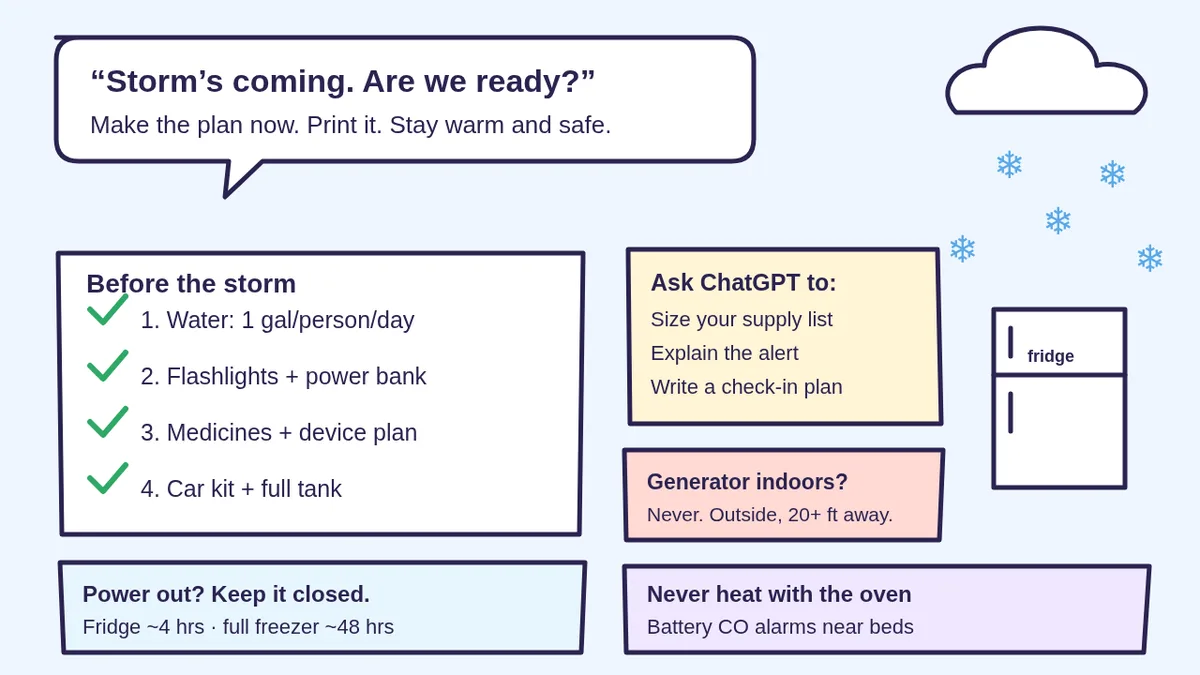
- Generators outside only. Ready.gov says generators and fuel should always be used outdoors and at least 20 feet away from windows, doors and attached garages. The CDC says never use a generator inside your home or garage, even if doors and windows are open.
- Never heat your home with a gas stove or oven. Ready.gov says it raises your risk of carbon monoxide poisoning and can cause fires and burns. The CDC adds: never burn charcoal indoors and never use a portable gas camp stove indoors.
- Carbon monoxide detectors. The CDC says to install battery-operated or battery back-up CO detectors near every sleeping area, and to check their batteries when you change your clocks in spring and fall. The CDC says more than 400 Americans die each year from unintentional CO poisoning not linked to fires.
- Don’t warm up the car in an attached garage. The CDC says never run a car or truck inside a garage attached to a house, even with the garage door open.
- Generator basics. Ready.gov says keep it dry, connect appliances with heavy-duty extension cords, let it cool before refueling, and follow the manufacturer’s instructions.
- Protect your electronics. Ready.gov says to disconnect appliances and electronics, because power may come back with surges that cause damage.
- Too cold at home? Ready.gov says to go to a community location with power if the cold is extreme, and to check with local officials about warming locations near you.
Step 4: When the power goes out
- Keep the fridge and freezer closed. FoodSafety.gov says the fridge keeps food safe for up to 4 hours; a full freezer holds about 48 hours (24 if half full) if the door stays closed. A thermometer in each helps.
- Check your CO detector is working, and keep any generator or grill outside.
- Save your phone battery and use flashlights for light. Ready.gov recommends flashlights for every household member.
- Check on the people on your list (your family check-in plan from prompt 6).
- Stay off the roads if you can. Ready.gov says if you’re trapped in your car, stay inside it.
Step 5: After the power comes back
- Food: Ready.gov and FoodSafety.gov say throw out food that’s been at 40°F or higher for 2 hours or more, or that has an unusual odor, color or texture. Frozen food that still has ice crystals or is at 40°F or below can be refrozen (quality may suffer). Never taste food to decide. When in doubt, throw it out.
- Medicine: Ready.gov says if the power is out for more than a day, discard any medication that should be refrigerated unless the label says otherwise, and contact your doctor or pharmacist right away for a new supply.
- Restock your kit and ask ChatGPT to update your checklist with anything you wished you’d had.
Know the signs: frostbite and hypothermia
Ready.gov lists these signs:
- Frostbite: numbness, white or grayish-yellow skin, firm or waxy skin, usually on the face, fingers and toes. Ready.gov says go to a warm room and soak in warm water; don’t massage or use a heating pad.
- Hypothermia: shivering, exhaustion, confusion, fumbling hands, memory loss, slurred speech or drowsiness. Ready.gov says a body temperature below 95 degrees is an emergency. Get to a warm room, warm the center of the body first and call 911.
Privacy: what to share with ChatGPT
You don’t need to share your address or medical records. A city or ZIP code is enough for a forecast, and “I use an oxygen concentrator” is enough for a plan. Keep account numbers and personal ID details off the chat and on your paper card instead. Want fewer chats saved? See ChatGPT Memory and Temporary Chat and Is my AI assistant safe?
Troubleshooting
- It made a list that’s way too long. Ask: “Cut this to what fits in one bin and costs under $[AMOUNT]. Mark what we already have.”
- It didn’t search for my forecast. Open the tools menu (View all tools) and pick Search, or type / and choose Search. OpenAI says if Search is missing, start a new chat, update the app or try chatgpt.com.
- It gave a number that doesn’t match Ready.gov. Trust the official page. Ask: “Which source did that come from? Link it.”
- I want reminders. Ask ChatGPT to set a monthly “check the kit” reminder with scheduled tasks, or just put it on your calendar.
- The Wi-Fi is down after the storm. Our fix tech problems guide walks you through getting back online step by step.
Why Bot Club is only $9 a month
This guide gives you six storm-prep prompts free. Bot Club is for having the right prompt ready before the next storm: the 10 extra prompts above (frozen pipes, medicine and device questions, phone battery, pets, kids, storm-day messages, heating bill help, generator questions, safe shoveling and an after-the-storm checklist) and the fill-in My Power-Out Card, plus every other members-only pack (scam checks, budgeting, bills and paperwork, holiday planning and more) in one Member Library, and a new recipe each month. Cancel anytime from your Stripe receipt.
Want it done faster?
🧰 Starter Kit: $29
24 copy-paste bot recipes, setup checklists and a safety checklist, with a ZIP of every recipe as a text file.
Get the Starter Kit: $29🏆 Bot Club: $9/month
The 10 storm-prep prompts and My Power-Out Card above, every other members-only pack, and a new recipe every month. Cancel anytime.
Join Bot Club: $9/mo🛠️ Done-for-you setup
$199 setup + $49/month. Run a small business, club or community group? We set up an AI assistant for your storm-day closure posts, customer and member updates and checklists, tested on your real everyday tasks, then keep it tuned every month.
Get set up: $199Planning for bigger emergencies too? See AI for earthquake and disaster prep for a family plan, go-bag and wallet contact card.
Study Buddy Engineer is independent and is not affiliated with OpenAI, FEMA, Ready.gov, the CDC, FoodSafety.gov, the USDA, NOAA or the National Weather Service. ChatGPT can make mistakes. This guide is general information, not medical, electrical or emergency advice. In an emergency, call 911 and follow your local officials.
Sources
- Ready.gov: Winter Weather (checked Nov 2, 2026)
- Ready.gov: Power Outages (checked Nov 2, 2026)
- Ready.gov: Build a Kit (checked Nov 2, 2026)
- Ready.gov: Emergency Alerts (checked Nov 2, 2026)
- CDC: Carbon Monoxide Poisoning Basics (checked Nov 2, 2026)
- FoodSafety.gov: Food Safety During Power Outage (checked Nov 2, 2026)
- National Weather Service: Winter Weather Safety (checked Nov 2, 2026)
- OpenAI Help: Searching the web with ChatGPT (checked Nov 2, 2026)
Keep going: related guides
- Fix tech problems with ChatGPT
- ChatGPT for seniors
- Plan Thanksgiving dinner with ChatGPT
- ChatGPT scheduled tasks (reminders)
🎁 Free: 10 copy-paste ChatGPT prompts
Ten short copy-paste prompts from our free guides, each with a Copy button:
- Reply to a customer review (good or bad)
- A week of social posts in 5 minutes
- Match your resume to one job posting
- Practice the interview out loud
- “Use up my fridge” dinners
- A “tight week” budget dinner plan
- Fill in your “trip card”
- Plan a road trip like a human
- “Explain it like I’m 10”
- “Grade my answer, don’t write it”
Free with an email signup. We never sell your email.
Pick the easiest way to get going
Three simple options. Secure checkout by Stripe.
🧰 Starter Kit
- Pick-your-assistant chart
- Setup checklists
- 24 copy-paste bot recipes
- Safety checklist + troubleshooting
🏆 Bot Club
- New bot recipes every month
- Ready-made templates
- Monthly “get unstuck” Q&A in the members area
- Cancel anytime
🛠️ Done-for-you setup
- We set up your assistant with you
- Monthly tuning: fixes, updates
- New recipes as you go
📬 Get one fun bot trick every week
The Bot Whisperer newsletter: free, plain English, unsubscribe anytime.
Coming soon: sign-ups open shortly. Follow @teachbots to hear when they do.