🏆 Bot Club, $9/mo: new copy-paste bot recipes and ready-made templates every month, plus a monthly “get unstuck” Q&A post in the members area. Cancel anytime.
Join Bot ClubThe 4 plans in plain English
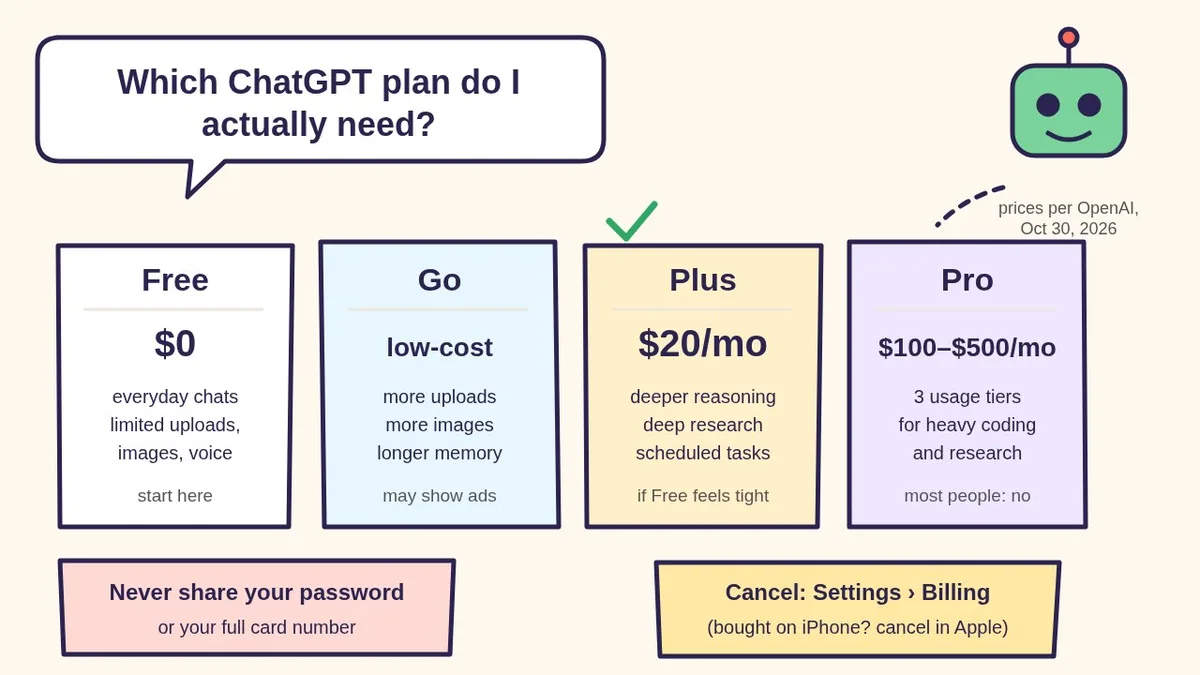
Here’s what OpenAI’s own pricing and help pages say (checked Oct 30, 2026). OpenAI doesn’t publish exact message counts for Free or Go, so we don’t either.
- Free ($0): “Best for trying out ChatGPT.” OpenAI says Free users have unlimited everyday text chats, subject to abuse-prevention safeguards. You can search the web, upload images or files, create images, analyze data and use GPTs, but uploads, image creation, voice, deep research and memory are limited. ChatGPT tells you when you hit a limit. OpenAI says ads may appear on Free in certain countries.
- Go (low-cost): “Best for longer conversations.” Everything in Free, plus more messages with tools, more uploads, more image creation and longer memory. OpenAI’s pricing page says Go may include ads. Price: OpenAI’s help page points you to the pricing page and says it may adjust Go’s price; when OpenAI launched Go worldwide on January 16, 2026, its announcement listed $8/month in the U.S. (localized in some countries). The pricing page didn’t show a number in our check, so look at chatgpt.com/pricing before you pay.
- Plus ($20/month): “Best for advanced work and productivity.” Everything in Go, plus advanced reasoning, expanded deep research, expanded messages, uploads, memory and context, more complex image creation, priority access during busy times, faster replies and early access to new features. OpenAI says Plus can still have message caps, especially during high demand.
- Pro ($100, $200 or $500/month): “Best for research and coding.” OpenAI’s help page lists three monthly Pro plans, Pro 100, Pro 200 and Pro 500, with more usage at each step. These are built for people who use ChatGPT for hours of research or coding every day.
All four are billed monthly. OpenAI says there’s no annual billing or paying months in advance for Go, Plus or Pro. And none of them include API usage (that’s billed separately for developers).
The 30-second plan picker
- “I ask it a few questions a week.” → Free. Seriously. Use the tips below first.
- “I keep hitting the limit on photos, files or pictures.” → Go is the small step up: more uploads, images and memory for the least money.
- “I use it for work, school or a side business, and I want it to think harder or do deep research.” → Plus.
- “I code or research with it for hours every day and keep running out on Plus.” → look at Pro. If you’re not sure, you don’t need Pro.
- “My school, job or nonprofit uses ChatGPT.” → Ask them first. OpenAI’s pricing page says Business and Enterprise are for businesses, ChatGPT Edu is for universities, and ChatGPT for Teachers is a free plan for verified U.S. K–12 educators through June 2027.
🧰 Want the shortcut? Get the Starter Kit ($29)
Everything from our guides in one download: a 2-minute “pick your assistant” chart, step-by-step setup checklists for ChatGPT Projects, Claude Projects and agent-style assistants, 24 copy-paste bot recipes (personal and small business), a safety and permissions checklist, and troubleshooting fixes. Includes a ZIP of every recipe as a ready-to-paste text file.
Get the Starter Kit: $29 See what’s inside →
One-time payment, secure checkout by Stripe, instant download page right after checkout.
Get the most out of Free before you pay
- Text chats don’t run out. OpenAI says Free has unlimited everyday text chats. The limits are on tools: file and image uploads, image creation, voice, data analysis and deep research. Save those for when they matter.
- “This chat is full”? OpenAI says you can start a new chat right away on Free. Paste just the paragraph you’re working on, plus any instructions it needs again. You can still read and copy from the old chat.
- Hit a tool limit? Wait for it to reset (ChatGPT shows the timing), or switch to plain text for a while. If you upgrade to Plus or Pro, OpenAI says your usage limits reset.
- Ask better, ask once. A clear first message saves a lot of back-and-forth. Our 4-part prompt formula is the fastest way to stretch Free.
- Use what Free already includes. OpenAI’s pricing page lists Projects and Study mode on every plan, and its Free FAQ mentions Library with 500 MB of storage. See ChatGPT Projects for beginners to stop retyping the same background.
- Compare before you commit. Claude and Gemini have free versions too. Our ChatGPT vs Claude vs Gemini guide helps you pick one assistant to pay for, not three.
3 free prompts to decide (and save money)
Paste these into ChatGPT (Free works fine). Change the words in [BRACKETS].
1. 🧭 “Which plan do I actually need?”
I'm deciding between ChatGPT Free, Go, Plus
and Pro. Interview me with 5 short questions,
one at a time, about how I use ChatGPT: how
often, for what, and whether I upload photos
or files. Then recommend ONE plan in plain
English and tell me what I'd lose by staying
on Free. Remind me to check today's prices at
chatgpt.com/pricing.
2. 🧺 “Get more from one message”
Good for Free users who keep hitting limits on files or long chats:
I'm on the free plan, so do this in ONE
reply: [TASK, e.g. plan a week of dinners for
2 on a $80 budget]. Ask me any questions you
need first, all at once. Then give me the
finished result in a short list I can save.
3. 🧾 “Is my subscription worth it?”
Use this a few days before a renewal. Don’t paste card numbers or receipts, just what you used it for:
I pay [$20] a month for ChatGPT [Plus]. This
month I used it for: [LIST]. Be honest: which
of these could I do on the free plan, which
really needed the paid plan, and should I keep
it, switch down, or cancel? Give me a yes/no
answer and one sentence why.
ChatGPT doesn’t see your account or billing, and it can be wrong about its own plans. OpenAI’s pricing and help pages are the final word.
🔒 Members-only
Members get the full pack: 12 more money-saving ChatGPT plan prompts + a fill-in “My ChatGPT Plan Check” card
Copy-paste prompts that help you pay for the right ChatGPT plan, or none: a one-week limit tracker, a trial-ending reminder plan, a “before I upgrade” checklist, a family-sharing talk (without sharing passwords), a work-vs-personal account sorter, a student plan check, a free-plan power session, a “compare 3 assistants” chooser, a mystery-charge detective, an Apple/Google/web “where did I subscribe?” finder, a cancel-script checklist and a yearly AI-spending review. Plus a fill-in My ChatGPT Plan Check card.
Bot Club · $9/mo · cancel anytime. Your Member Library opens right after checkout.
Join Bot Club, unlock the full pack · $9/moHow to upgrade (the safe way)
- Sign in at chatgpt.com or in the official ChatGPT app.
- Select your profile icon → Upgrade Plan.
- Choose Try Go or Get Plus (Pro plans are on the pricing page).
Pick one place to pay. OpenAI says your subscription is managed by wherever you bought it: chatgpt.com, the Apple App Store or Google Play. If you subscribe in a second place before canceling the first, you can be charged twice, and having two subscriptions doesn’t automatically get you a refund. If you use ChatGPT on several devices, OpenAI suggests subscribing on chatgpt.com so you can manage it from the web.
How to check your plan and billing
- Bought on chatgpt.com: sign in on the web, open Settings → Billing (some OpenAI pages call this area Account) to see your plan, invoices and next billing date. OpenAI notes the email that gets your receipts can be different from your ChatGPT login email.
- Bought on iPhone or iPad: Settings → your name → Subscriptions → ChatGPT.
- Bought on Android: Google Play Store → your profile picture → Payments & subscriptions → Subscriptions → ChatGPT.
- Paid but still on Free? OpenAI says to check you’re signed in to the same account you paid with (including “Continue with Apple” if you used Hide My Email), and on the phone app try Settings → Restore purchases.
How to cancel ChatGPT Plus (or Go or Pro)
Cancel in the same place you bought it:
- chatgpt.com: sign in → account menu → Settings → Billing → under Cancel plan, select Cancel.
- iPhone or iPad (Apple): Settings → your name → Subscriptions → ChatGPT → Cancel Subscription, then confirm.
- Android (Google Play): Play Store app → Subscriptions → ChatGPT → Cancel subscription.
Good to know, per OpenAI: cancel at least 24 hours before your next billing date; you keep paid features until the end of the period you paid for; deleting the app does not cancel; canceling doesn’t automatically refund past charges; and deleting your ChatGPT account does not cancel an Apple subscription. Switching from Plus or Pro down to Go also waits until your current billing cycle ends, with no refund for the rest of the month.
Troubleshooting
- “I was charged twice.” Check all three places above (web, Apple, Google). Keep one, cancel the others where you bought them. Apple refunds go through Apple.
- “I can’t sign in to cancel.” OpenAI says support can help if you give the account email plus two billing details, like the card’s last four digits or the date of the last charge. Never the full card number.
- “It says I hit a limit, even on Plus.” OpenAI says Plus can have message caps during high demand, and limits reset over time. Start a new chat or try later.
- “I want to try Claude or Gemini instead.” See ChatGPT vs Claude vs Gemini, or the Gemini app for beginners.
Why Bot Club is only $9 a month
This guide gives you three plan prompts free. Bot Club is for making whatever you pay for actually earn its keep: the 12 extra prompts above (a one-week limit tracker, a first-month reminder plan, a before-I-upgrade checklist, a no-password-sharing family talk, a work-or-personal sorter, a student/teacher check, a free-plan power session, a pick-one-assistant chooser, a mystery-charge detective, a where-did-I-subscribe finder, a cancel-day checklist and a yearly AI-spending review) and the fill-in My ChatGPT Plan Check card, plus every other members-only pack in one Member Library, and a new recipe each month. Cancel anytime from your Stripe receipt.
Want it done faster?
🧰 Starter Kit: $29
24 copy-paste bot recipes, setup checklists and a safety checklist, with a ZIP of every recipe as a text file.
Get the Starter Kit: $29🏆 Bot Club: $9/month
The 12 plan and money prompts and My ChatGPT Plan Check card above, every other members-only pack, and a new recipe every month. Cancel anytime.
Join Bot Club: $9/mo🛠️ Done-for-you setup
$199 setup + $49/month. Want an AI assistant set up for your family or business and tested on your real everyday tasks? We build it with you, then keep it tuned every month.
Get set up: $199More ChatGPT basics: ChatGPT prompts for beginners, ChatGPT for seniors and Is my AI assistant safe?
Study Buddy Engineer is independent and is not affiliated with, endorsed by or sponsored by OpenAI. ChatGPT is a trademark of OpenAI. Plans, prices, limits and menus change often, so always check OpenAI’s official pages below before you pay.
Sources
- ChatGPT: Plans and Pricing (checked Oct 30, 2026)
- OpenAI Help: ChatGPT Free Tier FAQ (checked Oct 30, 2026)
- OpenAI Help: What is ChatGPT Go? (checked Oct 30, 2026)
- OpenAI Help: What is ChatGPT Plus? (checked Oct 30, 2026)
- OpenAI Help: About ChatGPT Pro tiers (checked Oct 30, 2026)
- OpenAI Help: Canceling your ChatGPT subscription (checked Oct 30, 2026)
- OpenAI Help: How do I avoid being charged twice if I subscribe on iOS, Android and the web? (checked Oct 30, 2026)
- OpenAI: Introducing ChatGPT Go, now available worldwide (January 16, 2026) (checked Oct 30, 2026)
Keep going: related guides
- ChatGPT prompts for beginners
- ChatGPT vs Claude vs Gemini
- ChatGPT Projects for beginners
- Is this a scam? Check with ChatGPT
🎁 Free: 10 copy-paste ChatGPT prompts
Ten short copy-paste prompts from our free guides, each with a Copy button:
- Reply to a customer review (good or bad)
- A week of social posts in 5 minutes
- Match your resume to one job posting
- Practice the interview out loud
- “Use up my fridge” dinners
- A “tight week” budget dinner plan
- Fill in your “trip card”
- Plan a road trip like a human
- “Explain it like I’m 10”
- “Grade my answer, don’t write it”
Free with an email signup. We never sell your email.
Pick the easiest way to get going
Three simple options. Secure checkout by Stripe.
🧰 Starter Kit
- Pick-your-assistant chart
- Setup checklists
- 24 copy-paste bot recipes
- Safety checklist + troubleshooting
🏆 Bot Club
- New bot recipes every month
- Ready-made templates
- Monthly “get unstuck” Q&A in the members area
- Cancel anytime
🛠️ Done-for-you setup
- We set up your assistant with you
- Monthly tuning: fixes, updates
- New recipes as you go
📬 Get one fun bot trick every week
The Bot Whisperer newsletter: free, plain English, unsubscribe anytime.
Coming soon: sign-ups open shortly. Follow @teachbots to hear when they do.