🏆 Bot Club, $9/mo: new copy-paste bot recipes and ready-made templates every month, plus a monthly “get unstuck” Q&A post in the members area. Cancel anytime.
Join Bot ClubWhat ChatGPT Images can do (in plain English)
ChatGPT Images turns a sentence into a picture, and it can change pictures too. OpenAI’s help page says it can follow instructions to add text, add details inside the image, or make the background transparent, and you can upload your own photo and describe the changes you want.
On September 8, 2026, OpenAI released ChatGPT Images 2.5. OpenAI says it brings sharper details and more precise editing, cuts generation time by up to 50% compared with Images 2.0, and added three beginner-friendly extras: Sketch (draw a rough doodle as a guide), Templates (start from a poster, flyer or product-photo layout) and comments you can place right on an image.
| Question | Answer (from OpenAI’s help pages) |
|---|---|
| Which plans? | All plans, including Free. “Images with thinking” is on Plus, Pro and Business. |
| Where? | Web, iOS and Android. |
| How long? | “May take a few minutes,” depending on how complex your request is. You can keep chatting while it works. |
| Free limit? | Image creation has its own usage limit, stricter than paid plans. ChatGPT notifies you when you reach it, and you wait for it to reset. |
| DALL·E? | The DALL·E GPT has been retired from ChatGPT. Use ChatGPT Images instead. |
🧰 Want the shortcut? Get the Starter Kit ($29)
Everything from our guides in one download: a 2-minute “pick your assistant” chart, step-by-step setup checklists for ChatGPT Projects, Claude Projects and agent-style assistants, 24 copy-paste bot recipes (personal and small business), a safety and permissions checklist, and troubleshooting fixes. Includes a ZIP of every recipe as a ready-to-paste text file.
Get the Starter Kit: $29 See what’s inside →
One-time payment, secure checkout by Stripe, instant download page right after checkout.
Step 1: Make your first picture (2 minutes)
- Open the ChatGPT app or chatgpt.com and start a new chat.
- Type Create an image of and describe it. Or select More, then Images, and type your idea.
- Send it and wait. Bigger, busier requests take longer, so grab a coffee.
- Not quite right? Just reply in plain words: “make it brighter,” “make the dog smaller,” “square, please.”
Try this first, just for fun: Create an image of a golden retriever astronaut planting a flag on a moon made of cheese, bright cartoon style.
The 5-part picture recipe
Vague prompts give random pictures. Tell ChatGPT these five things and you’ll get much closer on the first try:
1. 🐶 Subject
Who or what is in it. “My orange cat,” “a red pickup truck,” “a cozy bakery counter.”
2. 🌄 Setting
Where and when. “In a sunflower field at sunset,” “on a rainy city street.”
3. 🎨 Style
How it should look. “Watercolor,” “photo-realistic,” “1950s poster,” “children’s book.”
4. 🔤 Exact words
Any text, in quotes, spelled exactly how you want it. Then check every letter.
5. 📐 Shape
Square for a profile picture, tall for a phone story, wide for a banner. OpenAI says you can use the aspect ratio picker or just say it in your prompt.
New to prompts in general? Our ChatGPT prompts for beginners guide explains the same idea for text.
3 copy-paste prompts to try today
1. 🎉 A party or event flyer
Create a tall flyer image (portrait, phone-friendly) for
[EVENT, e.g. "Mia's 8th Birthday Dino Party"].
Show [THEME, e.g. friendly cartoon dinosaurs and balloons].
Include ONLY this text, spelled exactly:
"[TITLE]"
"[DAY, DATE, TIME]"
"[PLACE]"
Big readable title, bright cheerful colors, lots of empty
space around the words. No other text.
Check the spelling, date and time letter by letter before you print or post it. If a word comes out wrong, reply: “Fix the spelling of [WORD] to [CORRECT WORD], change nothing else.”
2. 🐾 Turn a photo of your pet into art
Tap + and upload a clear photo of your pet (how-to: upload a photo to ChatGPT), then paste:
Turn the pet in this photo into a [STYLE, e.g. watercolor
storybook / Renaissance oil painting / superhero comic]
portrait. Keep their real markings, eye color and face shape
so they're still recognizable. [SETTING, e.g. sitting on a
velvet throne]. Square image. No text.
3. ✂️ Fix just one thing in a picture
Open the image, use Select to highlight only the part you want changed, then type:
Change only the area I selected: [WHAT TO CHANGE, e.g.
replace the gray sky with a soft sunset]. Keep everything
else exactly the same: same people, same colors, same
framing. Don't add any text.
OpenAI warns that highlights “are not always precise” and edits may spill outside the area you selected, so compare before and after. Saying “keep everything else exactly the same” helps.
🔒 Members-only
Members get the full pack: 12 more picture prompts + a fill-in prompt card
Copy-paste prompts for the pictures people actually want: a yard-sale or bake-sale sign, a garage-sale map, a holiday card from a family photo, a kid’s coloring page, a bedtime-story illustration, a room-makeover idea from a photo, a garden plan sketch, a simple logo idea, a social post graphic, a transparent-background sticker, a “what will my haircut look like” mock-up, and a fix-the-text repair prompt. Plus a fill-in 5-part prompt card to keep on your phone.
Bot Club · $9/mo · cancel anytime. Your Member Library opens right after checkout.
Join Bot Club, unlock the full pack · $9/moStep 2: Edit like a pro (without any design skills)
- Just describe it. Reply in the chat: “make the balloons blue.” OpenAI says to include the area in your prompt if the edit should only apply there.
- Use the selection tool. Select the image to open the editor, choose Select, highlight the part to change, then describe the change. There’s Undo, Redo, Cancel and Save, and an Aspect ratio button that regenerates the picture in a new shape.
- On your phone: tap the image to open it full screen. Tap Edit to describe changes, or Select to paint over an area (a slider sets the brush size), then Next and type what to change. OpenAI says mobile also has Resize and Remove, and you can add comments on the image.
- Start from a template. Open the sidebar, select Images, then Templates, pick a category and a template (like a poster or logo) and fill in your details. ChatGPT may ask follow-up questions about style. OpenAI notes templates aren’t in Work mode yet.
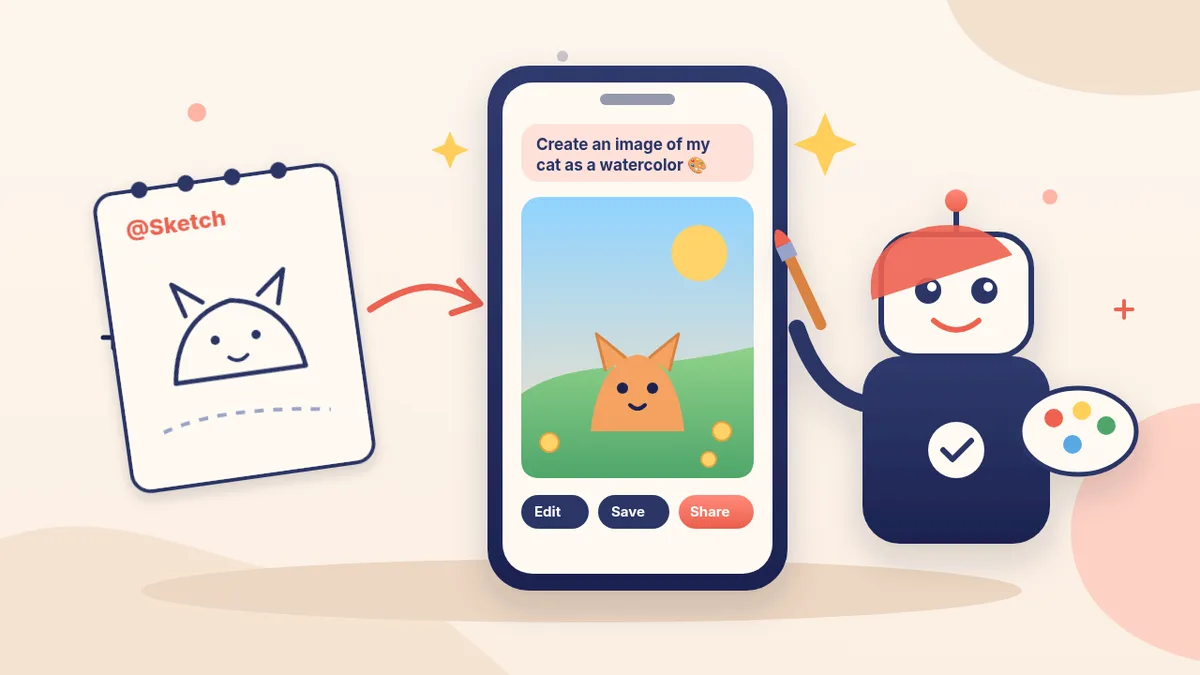
- Draw it first with Sketch (mobile app). In the message box type @ and choose Sketch, draw a rough doodle, tap the checkmark, then add instructions like OpenAI’s own example: “Turn this sketch into a watercolor painting of a red house surrounded by trees.”
Step 3: Save, share or delete your pictures
- Every picture you make is saved automatically under Images (web and mobile). Open one to Copy, Save (download to your device) or Share to another app.
- Share the recipe, not just the picture: on mobile, select Share, then Prompt template, then Copy link, so a friend can make their own version.
- To delete an image, delete the conversation it was made in. On the web, hover over the chat title, select •••, then Delete. On iPhone or Android, press and hold the chat title, then Delete.
The honest rules: real people, labels and who owns it
- Real people need their OK. OpenAI’s usage policies say you may not use someone’s likeness, including a photorealistic image of them, without their consent in ways that could confuse people about what’s real. Your own selfie or a family photo with everyone’s blessing is fine; a fake picture of a neighbor, coworker or celebrity is not.
- No fakes to fool people. The same policies ban using the service for deceit, fraud, scams or impersonation. Selling something online? Use real photos of the real item, so buyers see exactly what they’ll get.
- Pictures carry an AI label inside. OpenAI says images made with ChatGPT include C2PA “Content Credentials” and an invisible SynthID watermark. Content Credentials can be lost through everyday actions like screenshots or converting the file, while the watermark is designed to survive common changes. Anyone can upload an image at openai.com/verify to check for these signals. OpenAI also says these signals don’t replace visible labels where a label is needed.
- You own what you make (with a catch). OpenAI’s Terms of Use say that, as between you and OpenAI and to the extent the law allows, you own the Output, but output may not be unique, so someone else could get something similar. The terms also say you may not represent Output as human-generated when it wasn’t. For anything important, like a business logo, have a person check it before you rely on it.
- Teens: for a linked teen account, OpenAI says a parent or guardian may be able to control whether the teen can create or edit images.
Troubleshooting
- “You’ve hit your limit.” On Free, image creation has its own limit. ChatGPT tells you when you reach it; wait for the reset. OpenAI’s Free tier FAQ says your usage limits reset if you upgrade to Plus, Pro or Business.
- Words come out misspelled. Put the exact text in quotes, keep it short, and use prompt #15’s idea: ask it to fix only the text.
- It changed parts I didn’t select. OpenAI says highlights aren’t always precise. Undo, select a slightly smaller area, and add “keep everything else exactly the same.”
- My pet doesn’t look like my pet. Use a sharp, well-lit photo and say which features to keep (markings, eye color, ear shape).
- It’s taking forever. Complex pictures can take a few minutes. Keep chatting; it will show up in the conversation.
- It refused. OpenAI says it checks prompts and images to help prevent harmful outputs, so requests that break its usage policies (like a realistic fake of a real person) can be blocked. Rephrase toward something you have permission to make.
Want more ideas? Our 25 fun things to try with your AI bot has plenty, and social posts that don’t sound like ads shows how to pair a picture with words people actually read.
Why Bot Club is only $9 a month
This guide gives you the first three pictures free. Bot Club is for skipping the trial and error: the 12 extra picture prompts and the fill-in prompt card above, plus every other members-only prompt pack (social posts, emails, quotes, voice scripts and more) in one Member Library, and a new recipe each month, for one small monthly price. Cancel anytime from your Stripe receipt.
Want it done faster?
🧰 Starter Kit: $29
24 copy-paste bot recipes (including the Social Post Factory and Bedtime Story Maker), setup checklists and a safety checklist, with a ZIP of every recipe as a text file.
Get the Starter Kit: $29🏆 Bot Club: $9/month
The 12 picture prompts and prompt card above, every other members-only pack, and a new recipe every month. Cancel anytime.
Join Bot Club: $9/mo🛠️ Done-for-you setup
$199 setup + $49/month. Want an assistant set up for your business, ready for everyday writing and posts? We build it with you, test it on real tasks, then keep it tuned every month.
Get set up: $199Not sure which assistant fits you? Take the 2-minute AI sidekick quiz.
Making a holiday card picture? Pair it with the words inside: write holiday cards and a family letter with ChatGPT (3 free prompts and USPS mail-by dates).
Parents: image generation is one of the features you can switch off for a linked teen account. Here’s how to set up ChatGPT parental controls and set quiet hours too.
Sources
- OpenAI Help Center: Images in ChatGPT (checked Oct 23, 2026)
- OpenAI: Introducing ChatGPT Images 2.5 (Sept 8, 2026; checked Oct 23, 2026)
- OpenAI Help Center: ChatGPT Free Tier FAQ (checked Oct 23, 2026)
- OpenAI Help Center: Provenance signals in OpenAI-generated content (checked Oct 23, 2026)
- OpenAI Usage Policies (checked Oct 23, 2026)
- OpenAI Terms of Use (effective Jan 1, 2026; checked Oct 23, 2026)
🎁 Free: 10 copy-paste ChatGPT prompts
Ten short copy-paste prompts from our free guides, each with a Copy button:
- Reply to a customer review (good or bad)
- A week of social posts in 5 minutes
- Match your resume to one job posting
- Practice the interview out loud
- “Use up my fridge” dinners
- A “tight week” budget dinner plan
- Fill in your “trip card”
- Plan a road trip like a human
- “Explain it like I’m 10”
- “Grade my answer, don’t write it”
Free with an email signup. We never sell your email.
Pick the easiest way to get going
Three simple options. Secure checkout by Stripe.
🧰 Starter Kit
- Pick-your-assistant chart
- Setup checklists
- 24 copy-paste bot recipes
- Safety checklist + troubleshooting
🏆 Bot Club
- New bot recipes every month
- Ready-made templates
- Monthly “get unstuck” Q&A in the members area
- Cancel anytime
🛠️ Done-for-you setup
- We set up your assistant with you
- Monthly tuning: fixes, updates
- New recipes as you go
📬 Get one fun bot trick every week
The Bot Whisperer newsletter: free, plain English, unsubscribe anytime.
Coming soon: sign-ups open shortly. Follow @teachbots to hear when they do.