🏆 Bot Club, $9/mo: new copy-paste bot recipes and ready-made templates every month, plus a monthly “get unstuck” Q&A post in the members area. Cancel anytime.
Join Bot ClubWhy this matters right now
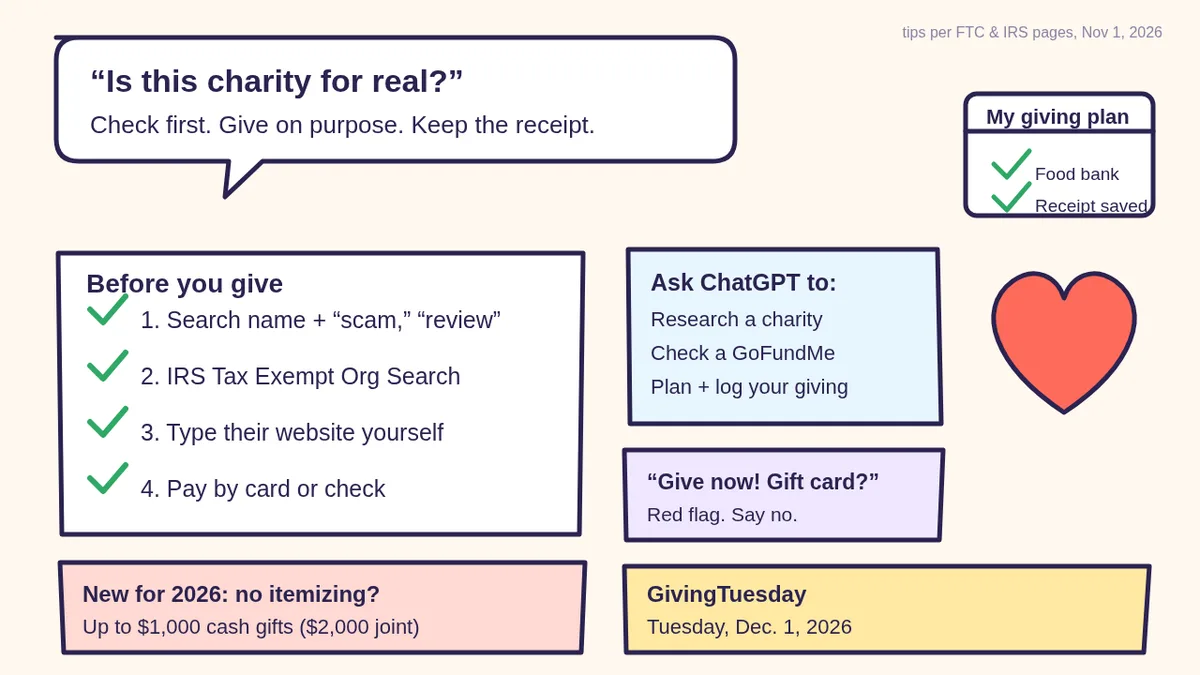
The weeks between Thanksgiving and New Year’s are when most of us get the most donation asks: GivingTuesday (Dec. 1, 2026), year-end letters, checkout-counter round-ups, social media fundraisers and phone calls. Most of those asks are real. A few aren’t, and the FTC says some scammers pick names that sound a lot like real charities, make vague, emotional claims with no specifics, or even “thank” you for a donation you never made so you’ll pay.
There’s also a new reason to keep good records this year. The IRS says that beginning with tax year 2026, if you don’t itemize, you may be able to deduct up to $1,000 of cash contributions to qualified charities ($2,000 if married filing jointly). That’s for 2026 gifts, claimed on the return you file in 2027. Gifts to individuals (like a personal fundraiser) don’t count.
Step 1: Decide your giving plan first (5 minutes)
The easiest way to say no to pressure is to already know your yes. Before the asks pile up, write down:
- Your total for the season, a number you pick. If money is tight, see make a simple budget with ChatGPT first.
- Two or three causes you care about most (for example, your local food bank, animal rescue, disaster relief, your place of worship).
- The specific charities you already know and trust for each cause, if any.
- A small “surprise” amount for a friend’s fundraiser or a new cause, so you can say “I’ve already planned my giving this year” to everyone else.
Then ask ChatGPT to turn it into a simple table (prompt 4 below). You stay in charge of the numbers; ChatGPT just keeps it tidy.
Step 2: Research the charity (ChatGPT does the legwork)
The FTC’s advice is simple: search the charity’s name plus words like “complaint,” “review,” “rating” or “scam,” and use groups that rate charities, like the BBB Wise Giving Alliance and CharityWatch. ChatGPT with web search can run those searches for you and summarize what it finds, with links you can open.
🧰 Want the shortcut? Get the Starter Kit ($29)
Everything from our guides in one download: a 2-minute “pick your assistant” chart, step-by-step setup checklists for ChatGPT Projects, Claude Projects and agent-style assistants, 24 copy-paste bot recipes (personal and small business), a safety and permissions checklist, and troubleshooting fixes. Includes a ZIP of every recipe as a ready-to-paste text file.
Get the Starter Kit: $29 See what’s inside →
One-time payment, secure checkout by Stripe, instant download page right after checkout.
6 copy-paste prompts to try today
Paste one into a new chat, fill in the [BRACKETS], and turn on web search for prompts 1 to 3.
1. 🔎 “Check this charity before I give”
Search the web and help me check a charity before
I donate. Charity name (exactly as they wrote it):
[NAME]. Their website, if I have it: [URL OR "NONE"].
How they reached me: [CALL / TEXT / EMAIL / MAIL /
SOCIAL POST / DOOR / I FOUND THEM MYSELF].
1. Search the name plus "complaint," "review,"
   "rating" and "scam." Summarize what you find
   and link every source.
2. Is there a well-known charity with a very
   similar name I might be confusing it with?
3. List anything I should check myself on the IRS
   Tax Exempt Organization Search and my state's
   charity regulator.
Don't guess. If you can't find something, say so.
2. 🚩 “Read this donation ask for red flags”
Here is a donation request I got (I removed my
name and address): [PASTE THE TEXT, EMAIL OR WHAT
THE CALLER SAID].
Check it against the FTC's charity scam red flags:
pressure to give right now, cash / gift card /
wire transfer requests, thanks for a donation I
don't remember making, vague emotional claims
with no specifics, a name that sounds like a
famous charity, promises of prizes for donating,
and claims it's tax-deductible.
Give me: red flags found, questions to ask before
giving, and a polite way to say "not today."
3. 🤝 “Should I give to this GoFundMe-style fundraiser?”
A [FRIEND / STRANGER / LOCAL GROUP] shared a
crowdfunding campaign: [PASTE THE TITLE, ORGANIZER
NAME AND STORY, NO LINKS NEEDED].
Using the FTC's crowdfunding tips, give me a short
checklist: who the organizer is and how they're
connected to the person being helped, what I
should ask the friend who shared it, how to do a
reverse image search on the photos, the
platform's fees, and whether giving directly to a
charity would make more sense. Remind me that
gifts to individuals aren't tax-deductible.
The FTC says the safest way to give through crowdfunding is to donate to campaigns organized by people you know and trust, and that the money goes to the campaign organizer, who controls how it’s spent.
4. 📋 “Make my holiday giving plan”
Help me plan my giving for the rest of 2026.
My total for the season: $[AMOUNT I CHOSE].
Causes I care about: [2-3 CAUSES].
Charities I already trust: [NAMES OR "NONE YET"].
Make a simple table: charity, cause, amount, how
I'll pay (credit card or check only), date, and a
"receipt saved?" column. Keep $[SMALL AMOUNT] as
a "surprise" line for a friend's fundraiser.
Then write one friendly sentence I can say to
callers: "I've already planned my giving."
5. 🧾 “Set up my donation record list for taxes”
Make me a simple donation log I can keep in a
note or spreadsheet for 2026 taxes. Columns:
date, charity's exact legal name, amount, cash or
item donated, how I paid, receipt or bank record
saved (yes/no), and "written acknowledgment for
$250+ received (yes/no)."
Then explain in plain words, using IRS guidance,
what records I need for cash gifts, what a $250+
acknowledgment letter should say, and the new
2026 deduction for people who don't itemize. Tell
me to confirm my own situation with the IRS or a
tax professional.
6. 📞 “Help me say no to a pushy fundraiser”
A caller keeps asking me to donate to [NAME] and
wants a decision today. Write me a short, polite
script to: say I don't give over the phone, ask
them to mail information instead, ask for the
charity's full name and website so I can look it
up myself, and end the call. Also tell me what to
do if they say I already pledged and owe money
(I don't remember pledging).
The FTC warns that scammers can fake caller ID to look like a local number, and that some try to trick you into paying by thanking you for a donation you never made.
🔒 Members-only
Members get the full pack: 10 more safe-giving prompts + a fill-in “My Giving Plan” card
Copy-paste prompts for checking a disaster-relief appeal, comparing two charities side by side, finding and canceling a recurring donation you didn’t mean to set up, giving in someone’s name as a holiday gift, donating clothes or household items (and the records to keep), asking your employer about matching gifts, checking a social-media or celebrity fundraiser, volunteering instead of giving money, writing a year-end thank-you to the charities you support, and a January “did every receipt arrive?” check. Plus a fill-in My Giving Plan card for the fridge.
Bot Club · $9/mo · cancel anytime. Your Member Library opens right after checkout.
Join Bot Club, unlock the full pack · $9/moStep 3: Check it yourself the official way
- IRS Tax Exempt Organization Search. The IRS says you can use it to check an organization’s eligibility to receive tax-deductible charitable contributions (“Pub. 78 Data”), plus its tax-exempt status and filings. The IRS adds that some eligible groups, like certain churches and government organizations, may not appear separately, so not finding a group isn’t automatically a red flag. Ask the charity if you can’t find it.
- Your state charity regulator. The FTC says you can find yours at nasconet.org, and that most states require the charity or its fundraiser to register to ask for donations.
- A charity evaluator. The FTC lists the BBB Wise Giving Alliance and CharityWatch as organizations that offer reports and ratings on how charities spend donations.
- The charity’s own website, typed in yourself. Not a link from a text, email or ad. The FTC says to make sure you know who is receiving your donation before you click a link to donate online.
Step 4: Pay the safer way and keep records
- Credit card or check only. The FTC says if someone wants donations in cash, by gift card or by wiring money, don’t do it.
- Check your statement. The FTC says to make sure you’re only charged what you agreed to, and that you’re not signed up for a recurring donation by mistake.
- Keep a record of every gift. The IRS says for any cash, check or other money gift, keep a bank record or a written communication from the charity showing its name, the amount and the date.
- $250 or more? The IRS says you need a written acknowledgment from the charity for any single contribution of $250 or more, saying whether you got anything in return (like a dinner ticket) and, if so, a good-faith estimate of its value.
- Got something back? The IRS says if you receive a benefit like merchandise or a charity dinner, you can only deduct the amount above the fair market value of what you received.
- Donor-advised funds: the IRS says gifts to donor-advised funds generally don’t qualify for the new 2026 non-itemizer deduction.
Online fundraising platforms and round-ups
Giving through a big website’s “donate” button or a checkout round-up can be convenient, but the FTC says your money may not go directly to the charity: the platform or another company may get it first, keep a fee, and pass the rest on later. Good platforms clearly tell you where the money goes, the fees, whether it’s tax-deductible, timing and what happens if it can’t be delivered. If that’s not clear, the FTC suggests giving directly on the charity’s own website.
Gave to a scam? Do this now
- Stop contact and don’t send more money, even if they push.
- Call your card company or bank using the number on your card and ask about disputing the charge.
- Report it at ReportFraud.ftc.gov, and to your state charity regulator. The FTC says to share the organization or fundraiser’s name, phone number and what they said.
- Crowdfunding? The FTC says to report the campaign to the platform first, then to the FTC and your state attorney general.
- Need help writing it up? Our scam-check guide has a prompt that turns what happened into a clear report.
Privacy: what to share with ChatGPT
Share the charity’s name and the ask, not your details. Cover your name, address, phone number, card and bank numbers before pasting a letter or screenshot. Want fewer chats saved? Use a Temporary Chat; see ChatGPT Memory and Temporary Chat and Is my AI assistant safe?
Troubleshooting
- It didn’t search the web. Open the tools menu (View all tools) and pick Search, or type / and choose Search. OpenAI says if Search is missing, start a new chat, update the app or try chatgpt.com in your browser.
- It found nothing about a small local group. That’s common for small groups. Ask the group for its legal name and EIN, check the IRS search yourself, or call a local leader you already know.
- It sounds too sure. Ask: “Which of these points came from a source? Link each one.” Then open the links.
- Two charities have nearly the same name. Ask ChatGPT to compare their official websites side by side, then give only on the one you typed in yourself.
- Tax question about your situation. ChatGPT can explain the IRS pages in plain words, but confirm with the IRS or a tax professional. Our tax papers guide helps you get organized.
Why Bot Club is only $9 a month
This guide gives you six safe-giving prompts free. Bot Club is for having the right prompt ready when the asks start: the 10 extra prompts above (disaster relief, comparing two charities, recurring charges, giving in someone’s name, donating items, employer matching, social-media fundraisers, volunteering, thank-yous and a January receipt check) and the fill-in My Giving Plan card, plus every other members-only pack (scam checks, budgeting, bills and paperwork, holiday shopping and more) in one Member Library, and a new recipe each month. Cancel anytime from your Stripe receipt.
Want it done faster?
🧰 Starter Kit: $29
24 copy-paste bot recipes, setup checklists and a safety checklist, with a ZIP of every recipe as a text file.
Get the Starter Kit: $29🏆 Bot Club: $9/month
The 10 safe-giving prompts and My Giving Plan card above, every other members-only pack, and a new recipe every month. Cancel anytime.
Join Bot Club: $9/mo🛠️ Done-for-you setup
$199 setup + $49/month. Run a nonprofit or small business? We set up an AI assistant for your donor emails, thank-yous and newsletters, tested on your real everyday tasks, then keep it tuned every month.
Get set up: $199Shopping for gifts too? See holiday shopping with ChatGPT (gift budget, deal checks and safer payment). Run a nonprofit? Browse AI for nonprofits, food banks and clubs.
Study Buddy Engineer is independent and is not affiliated with OpenAI, the FTC, the IRS, GivingTuesday, the BBB Wise Giving Alliance, CharityWatch, NASCO or any charity or fundraising platform named here. We don’t rate or recommend specific charities. ChatGPT can make mistakes. This guide is general information, not tax, legal or financial advice; check your own situation with the IRS or a tax professional.
Sources
- FTC Consumer Advice: Donating Safely and Avoiding Scams (checked Nov 1, 2026)
- FTC Consumer Advice: Donating Through Crowdfunding and Fundraising Platforms (checked Nov 1, 2026)
- IRS: Tax Exempt Organization Search (checked Nov 1, 2026)
- IRS Topic no. 506, Charitable contributions (checked Nov 1, 2026)
- IRS Publication 6196: Charitable Contribution Deduction Tips for Non-Itemizers (PDF) (checked Nov 1, 2026)
- OpenAI Help: Searching the web with ChatGPT (checked Nov 1, 2026)
- GivingTuesday: United States (Dec. 1, 2026) (checked Nov 1, 2026)
Keep going: related guides
- Is this a scam? Check it with ChatGPT
- Holiday shopping with ChatGPT
- Make a simple budget with ChatGPT
- Get your tax papers ready with ChatGPT
🎁 Free: 10 copy-paste ChatGPT prompts
Ten short copy-paste prompts from our free guides, each with a Copy button:
- Reply to a customer review (good or bad)
- A week of social posts in 5 minutes
- Match your resume to one job posting
- Practice the interview out loud
- “Use up my fridge” dinners
- A “tight week” budget dinner plan
- Fill in your “trip card”
- Plan a road trip like a human
- “Explain it like I’m 10”
- “Grade my answer, don’t write it”
Free with an email signup. We never sell your email.
Pick the easiest way to get going
Three simple options. Secure checkout by Stripe.
🧰 Starter Kit
- Pick-your-assistant chart
- Setup checklists
- 24 copy-paste bot recipes
- Safety checklist + troubleshooting
🏆 Bot Club
- New bot recipes every month
- Ready-made templates
- Monthly “get unstuck” Q&A in the members area
- Cancel anytime
🛠️ Done-for-you setup
- We set up your assistant with you
- Monthly tuning: fixes, updates
- New recipes as you go
📬 Get one fun bot trick every week
The Bot Whisperer newsletter: free, plain English, unsubscribe anytime.
Coming soon: sign-ups open shortly. Follow @teachbots to hear when they do.