🏆 Bot Club, $9/mo: new copy-paste bot recipes and ready-made templates every month, plus a monthly “get unstuck” Q&A post in the members area. Cancel anytime.
Join Bot ClubWhy this is worth 15 minutes
Holiday spending usually goes wrong in the same three places: no total budget, one person who is “impossible to buy for,” and a too-good-to-be-true deal clicked in a hurry. ChatGPT is good at all three. It turns a scribbled list into a tidy budget table, asks the questions you didn’t think of about a tricky gift, and walks you through a calm checklist before you pay. You still decide and you still buy. It just gets you there faster and with less regret in January.
What ChatGPT’s shopping tools can do (from OpenAI)
Checked Nov 2, 2026, on OpenAI’s “Shopping with ChatGPT Search” help page. Heads-up: OpenAI’s older “shopping research” help page now sends you to that page, which no longer describes a separate buyer’s-guide mode, so this guide now sticks to what the current page says. Tell ChatGPT what you need and let it do the comparing, then you do the checking.
- Product results: when your question suggests shopping (OpenAI’s example: “Help me find costumes for my dog”), ChatGPT can show product options with pictures, product details and links to stores where you can learn more or buy.
- Compare and narrow it down: ask it to compare products, explain trade-offs or suggest alternatives. Include your budget and must-haves, and ask it to adjust if the results miss.
- “Try on” for clothes and accessories: a Try on button on those listings uses a selfie to show how the item could look on you. OpenAI says try-on images don’t guarantee fit or size, so check the store’s measurements and return policy.
- Save for later: tap a product’s bookmark icon to save it to Favorites, or make a folder, in your ChatGPT Library.
- Not ads, but not guarantees. OpenAI says product results are picked independently by ChatGPT, aren’t ads and aren’t influenced by OpenAI partnerships (ads are shown separately). Labels like “Budget-friendly” are generated by ChatGPT, review summaries are model-written, reviews and ratings aren’t verified by OpenAI, and the first price you see may not be the lowest (look for a “Best price” label when several stores sell it).
- Memory can tailor results. OpenAI says ChatGPT considers your question and context such as Memory or Custom Instructions. See ChatGPT Memory for beginners to review or turn it off.
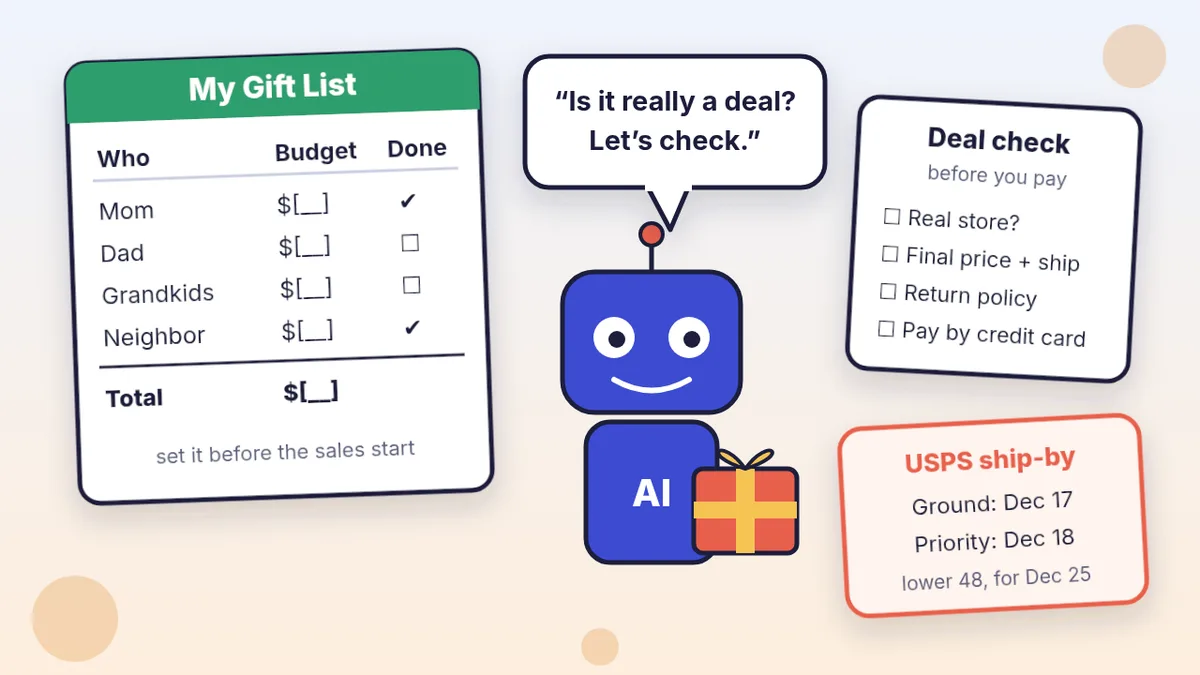
USPS ship-by dates for December 25 (2026)
From USPS’s 2026 Holiday Shipping Deadlines page, for the lower 48 states. USPS notes actual delivery can vary.
- USPS Ground Advantage and First-Class Mail: Thursday, Dec. 17
- Priority Mail: Friday, Dec. 18
- Priority Mail Express: Saturday, Dec. 19
- Hanukkah is early this year (Dec. 4 to Dec. 12), USPS says, so mail those gifts sooner. Shipping to Alaska, Hawaii or a U.S. territory? USPS says Ground Advantage can take 10 days or more; check the page before you mail.
🧰 Want the shortcut? Get the Starter Kit ($29)
Everything from our guides in one download: a 2-minute “pick your assistant” chart, step-by-step setup checklists for ChatGPT Projects, Claude Projects and agent-style assistants, 24 copy-paste bot recipes (personal and small business), a safety and permissions checklist, and troubleshooting fixes. Includes a ZIP of every recipe as a ready-to-paste text file.
Get the Starter Kit: $29 See what’s inside →
One-time payment, secure checkout by Stripe, instant download page right after checkout.
Step 1: Make your list first (5 minutes)
- Everyone you buy for, plus “extras”: teachers, neighbors, the office gift swap, hosts.
- One line about each person: hobbies, sizes if you know them, and anything they already have.
- Your total holiday budget, including wrapping, cards and shipping. If you don’t have a number yet, our simple monthly budget guide helps you find one.
3 copy-paste prompts to try today
1. 🎁 Turn my messy list into a gift budget
Help me plan holiday gifts on a budget. My total budget
is $[TOTAL], including wrapping, cards and shipping.
People I buy for (with a few words about each):
[NAME - AGE OR RELATION - LIKES - SIZES IF KNOWN]
[...]
1. Make a table: Person | Spending limit | 3 gift ideas
   | Where I might buy it | Ship or hand over? | Done.
2. Split my budget fairly, and keep $[AMOUNT] aside for
   wrapping, cards and shipping. Show the total so I can
   check that it adds up.
3. For each person, add one free or homemade idea.
4. Don't invent prices. Write [CHECK PRICE] instead of a
   number unless I gave you one.
Use short, simple words.
Check the totals with a calculator; chatbots can make math mistakes. Keep this chat open (or save it in a ChatGPT Project) and update the Done column as you shop.
2. 🔎 Research one hard-to-buy-for person
Help me find a gift for my [RELATION],
who is [AGE] and loves [HOBBIES]. They already have
[THINGS THEY HAVE]. My limit is $[AMOUNT] including
shipping, and it must arrive by [DATE].
Before you search, ask me up to 4 quick questions.
Then show me:
- 3 top picks with why each fits and one downside each
- one pick under half my limit
- for each, the store you found it at
Remind me to confirm the final price, shipping date
and return policy on the store's own site.
Product picks may show up as cards with pictures and store links. Tap the bookmark to save one to your Library, and say “cheaper,” “more practical” or “something they can do, not own” to steer it.
3. 🛡️ Is this deal real? Check before I pay
I'm about to buy this. Here's the ad or listing text and
the website address: [PASTE TEXT + WEB ADDRESS]
Price shown: $[PRICE]. How I found it: [E.G. A SOCIAL
MEDIA AD, AN EMAIL, A TEXT, A STORE I KNOW].
1. List any warning signs: a price far below other
   stores, a web address that doesn't match the brand,
   pressure to hurry, or a seller who wants payment by
   gift card, wire transfer, payment app or crypto.
2. Write the exact words to search for to check the
   seller (name + "reviews", "complaints", "scam").
3. Make a 5-line checklist for me to confirm on the
   store's own site: final price with tax and shipping,
   delivery date, return policy, who the seller is, and
   how I'm paying.
Don't tell me it's safe. Tell me what to check.
Never paste your card number into the chat. If something already went wrong, see “Paid and something went wrong?” below.
🔒 Members-only
Members get the full pack: 12 more holiday shopping prompts + a fill-in “Holiday Gift Planner” card
Copy-paste prompts for the whole season: a Black Friday and Cyber Monday game plan, compare one item at 3 stores from your own notes, a “was $X, now $Y” sanity check, a return-policy explainer, a ship-by countdown with the USPS dates, age-right gift ideas for kids, gift card safety check, an office gift swap or Secret Santa plan, “they have everything” gift ideas, thank-you notes, an after-holiday returns tracker and a January statement check. Plus a fill-in Holiday Gift Planner card.
Bot Club · $9/mo · cancel anytime. Your Member Library opens right after checkout.
Join Bot Club, unlock the full pack · $9/moStep 2: Check on the store’s site, not in the chat
- Confirm the final price. OpenAI says to confirm the final price, taxes, fees and shipping on the retailer’s website, and to verify availability, size and color.
- Read the return and warranty policy if it matters, OpenAI says. Gifts get returned more than most things you buy.
- Check the seller. Search the store’s name and web address with “reviews,” “complaints” or “scam.” A brand-name item at a price far below every other store, sold through a social media ad, deserves extra checking.
- Bring results back to ChatGPT only to organize them. Paste your own notes and use members’ prompt #5 to line them up.
Step 3: Pay the safer way and keep records
- Use a credit card when you can. The Consumer Financial Protection Bureau (CFPB) says that to dispute a charge, you should call the card company right away, and to protect your rights you must also send a written billing error notice within 60 calendar days after the charge appeared on your statement.
- Red flag: a seller who will only take a gift card, wire transfer, payment app or cryptocurrency. Walk away.
- Keep your receipt and order confirmation in one email folder or a phone note. You’ll need them for returns, late deliveries and disputes.
Paid and something went wrong?
- Card charge you don’t recognize or an order that never came: call your card company and follow the CFPB steps above. Ask ChatGPT to help you write the dispute letter from your notes (no card numbers in the chat).
- Think it was a scam? USA.gov has a free “where to report a scam” tool that asks a few questions and points you to the right agency to report it.
- For more scam warning signs in emails, texts and letters, see understand bills, letters and forms with ChatGPT.
Privacy tips
- Gift ideas and dollar amounts are enough. ChatGPT never needs your card number, bank login, address or passwords to help you plan.
- Shopping for a surprise on a shared account? Use a Temporary chat, or turn Memory off, so it doesn’t show up later; see Is my AI assistant safe?.
- “Try on” photos: OpenAI says ChatGPT saves reference photos for clothing try-ons, and you can change or remove them in Settings, Personalization, Reference photos.
Troubleshooting
- It made up a price. Say: “Don’t guess prices. Write [CHECK PRICE] unless you found it at a named store.” Then check the store’s site.
- Its ideas are boring. Add two specific details (“loves birdwatching, has a small apartment”) and ask for 10 more ideas, “no gadgets.”
- The totals don’t add up. Ask it to show the math line by line, and check with a calculator.
- It feels like too much. Do just prompt #1 today. A list with a total budget is half the job.
More holiday help: plan the big meal with plan Thanksgiving dinner with ChatGPT, travel with the ChatGPT trip planner, or sell the stuff you no longer need with resale listings with ChatGPT.
Why Bot Club is only $9 a month
This guide gives you the first three holiday shopping prompts free. Bot Club is for having the right prompt ready all season: the 12 extra prompts (Black Friday and Cyber Monday plan, 3-store comparison from your notes, “was $X, now $Y” check, return-policy explainer, ship-by countdown, kids’ gift ideas, gift card safety check, office gift swap, “they have everything” ideas, thank-you notes, returns tracker and January statement check) and the fill-in Holiday Gift Planner card above, plus every other members-only pack (budgeting, Thanksgiving, bills and paperwork, emails, spreadsheets and more) in one Member Library, and a new recipe each month. Cancel anytime from your Stripe receipt.
Want it done faster?
🧰 Starter Kit: $29
24 copy-paste bot recipes, setup checklists and a safety checklist, with a ZIP of every recipe as a text file.
Get the Starter Kit: $29🏆 Bot Club: $9/month
The 12 holiday shopping prompts and Gift Planner card above, every other members-only pack, and a new recipe every month. Cancel anytime.
Join Bot Club: $9/mo🛠️ Done-for-you setup
$199 setup + $49/month. Want an AI assistant set up for your business and tested on your real everyday tasks? We build it with you, then keep it tuned every month.
Get set up: $199Not sure which assistant fits you? Take the 2-minute AI sidekick quiz.
Study Buddy Engineer is independent and is not affiliated with OpenAI, USPS or any retailer, and we don’t sell the products mentioned here. This guide is general information, not financial or legal advice.
Got a “your package is on hold” text? The U.S. Postal Inspection Service says USPS won’t text you a link unless you asked for tracking. Get a calm second opinion and report it the right way with Is this a scam? Check it with ChatGPT.
Cards on your list too? USPS recommends mailing holiday cards by First-Class Mail by Thursday, Dec. 17 for expected delivery by Dec. 25 in the lower 48 states. Get warm card messages, a short family letter and client thank-yous from a few notes with holiday cards and a family letter with ChatGPT.
Giving to charity this season too? Learn how to check a charity before you donate with ChatGPT: research the name, spot FTC red flags, check a GoFundMe-style fundraiser and keep the receipts the IRS asks for.
Buying a phone as a gift? Plan the setup before you wrap it. Our guide to set up a new phone for a parent or grandparent has the charge-both-phones checklist, the 5 settings that matter most, and 6 copy-paste prompts.
Hunting for a gift that’s sold out? Search it with “near me” and Google may offer to call nearby stores to check stock and prices for you. See how to let AI help with phone calls, including where it works.
Package stuck after you ordered? See delayed or missing package? delivery rights + ChatGPT help: the FTC’s 30-day ship rule, a cancel/refund email prompt, USPS missing-mail steps, and how to spot fake “delivery” texts.
Sources
- OpenAI Help Center: Shopping with ChatGPT Search (checked Nov 2, 2026; OpenAI’s older “Using shopping research in ChatGPT” page now redirects here)
- USPS: 2026 Holiday Shipping Deadlines (checked Oct 26, 2026)
- CFPB: How do I dispute a charge on my credit card bill? (checked Oct 26, 2026)
- USA.gov: Learn where to report a scam (checked Oct 26, 2026)
Keep going: related guides
- Make a simple monthly budget
- Plan Thanksgiving dinner
- Understand bills, letters and forms
- Plan a relaxed trip
🎁 Free: 10 copy-paste ChatGPT prompts
If this guide helped, these two free trip-planning prompts pair well with it, with a Copy button:
- Fill in your “trip card”
- Plan a road trip like a human
The pack also has 8 more copy-paste prompts from our other free guides (job search, meals, trips, study and small business).
Free with an email signup. We never sell your email.
Pick the easiest way to get going
Three simple options. Secure checkout by Stripe.
🧰 Starter Kit
- Pick-your-assistant chart
- Setup checklists
- 24 copy-paste bot recipes
- Safety checklist + troubleshooting
🏆 Bot Club
- New bot recipes every month
- Ready-made templates
- Monthly “get unstuck” Q&A in the members area
- Cancel anytime
🛠️ Done-for-you setup
- We set up your assistant with you
- Monthly tuning: fixes, updates
- New recipes as you go
📬 Get one fun bot trick every week
The Bot Whisperer newsletter: free, plain English, unsubscribe anytime.
Coming soon: sign-ups open shortly. Follow @teachbots to hear when they do.