🏆 Bot Club, $9/mo: new copy-paste bot recipes and ready-made templates every month, plus a monthly “get unstuck” Q&A post in the members area. Cancel anytime.
Join Bot ClubWhy this is worth 10 minutes
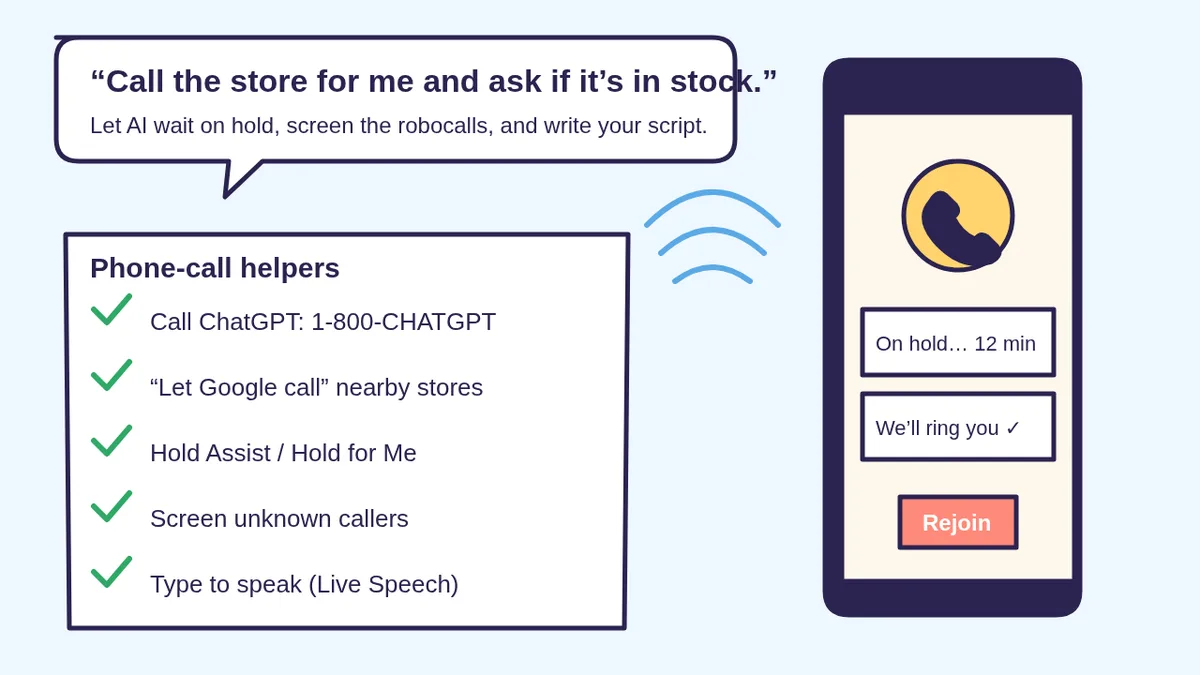
Calling around to find a toy in stock, waiting 40 minutes on hold for the cable company, or dodging robocalls all day: phones eat time, and for a lot of people a phone call is stressful. A few new tools quietly fix the worst parts. Some talk to you (ChatGPT on the phone), some call businesses for you (Google), and some guard your phone (call screening and hold helpers). ChatGPT, in the app or by phone, is also great for the part before the call: writing a short script so you know exactly what to say.
Step 1: Call ChatGPT from any phone (1-800-CHATGPT)
OpenAI’s help page calls 1-800-ChatGPT an experimental way to talk to ChatGPT by phone call without an account:
- Dial 1-800-CHATGPT (1-800-242-8478) from a U.S. or Canadian number in a supported country. Standard carrier fees may apply.
- 30 minutes a month free (U.S. and Canada). OpenAI says it may adjust limits based on capacity, warns you as you get close, and suggests the ChatGPT app or chatgpt.com after that.
- It’s for ages 13+, and OpenAI says ChatGPT can make mistakes, so check important info.
- Privacy: OpenAI says it stores and may review calls and transcripts for a limited time for safety and abuse prevention, and your conversations are tied to the phone number you called from. Don’t say anything you wouldn’t want stored.
- Find a quiet spot. OpenAI says background noise can cause unintended responses; headphones help, and on iPhone OpenAI suggests turning on Voice Isolation under Mic Mode.
Use the right number. OpenAI’s help page also lists a separate automated support line, 1-888-GPT-0090, for product and account questions. Only trust numbers you find on OpenAI’s own help pages, never one from an ad, a pop-up or a text.
Step 2: Let ChatGPT write your call script
Paste these into a new chat (or read them to 1-800-CHATGPT) and fill in the [BRACKETS]. Never include account numbers or passwords; you’ll have those in front of you on paper.
🧰 Want the shortcut? Get the Starter Kit ($29)
Everything from our guides in one download: a 2-minute “pick your assistant” chart, step-by-step setup checklists for ChatGPT Projects, Claude Projects and agent-style assistants, 24 copy-paste bot recipes (personal and small business), a safety and permissions checklist, and troubleshooting fixes. Includes a ZIP of every recipe as a ready-to-paste text file.
Get the Starter Kit: $29 See what’s inside →
One-time payment, secure checkout by Stripe, instant download page right after checkout.
6 copy-paste prompts to try today
1. 📝 “Write my phone call script”
I need to call [COMPANY OR OFFICE] about [PROBLEM].
What I want: [REFUND / FIX / APPOINTMENT / ANSWER].
Write a short, polite script I can read out loud:
1. How to open the call in one sentence
2. My 3 main points, in order
3. The 3 questions they'll most likely ask me
   and what to have ready (no real numbers here)
4. What to say if they say no
Keep it to one screen, big simple words.
2. 🛍️ “What should Google ask the store?”
I'm going to use Google's "Let Google call"
to check if nearby stores have [PRODUCT] in
stock. Help me get my request right before I
submit it: the exact model or size, a backup
option if it's sold out, my price limit
[$AMOUNT], and whether I want deals mentioned.
Then give me a 3-line summary I can use.
3. ⏳ “Get me ready for a long hold”
I have to call [INSURANCE / CABLE / AIRLINE /
PHARMACY] and expect a long hold. Make me a
checklist of what to have on paper before I
call (no real numbers in this chat), the menu
words to say to reach a person, and a place to
write the rep's name, the date, and the
reference number. Then a 2-line closing to
confirm what they promised.
4. 📋 “Turn my call notes into a to-do list”
Here are my rough notes from a phone call with
[COMPANY] (I've removed account numbers):
[PASTE NOTES OR A TRANSCRIPT]
Turn them into: what they agreed to do, by
when, what I need to do next, and a short
follow-up email I can send to confirm it in
writing. Flag anything that sounds vague.
5. 🧭 “Which phone helper should I use?”
Ask me up to 6 questions, one at a time,
about my phone (iPhone or Android, which
model), where I live, and what I want help
with (calling stores, waiting on hold, scam
calls, talking is hard for me). Then tell me
which built-in or free tools fit, with the
official help page link for each. If you're
not sure a feature exists on my phone, say so.
6. 🗣️ “Phrases for typing instead of talking”
Talking on the phone is hard for me because
[REASON, E.G. SPEECH, HEARING, ANXIETY]. I use
iPhone's Live Speech to type and have my words
spoken. Write 12 short saved phrases I can tap
during calls, like "Please give me a moment, I'm
typing" and "Can you text or email me that?"
Keep each under 12 words, friendly and clear.
🔒 Members-only
Members get the full pack: 10 more phone-call prompts + a fill-in Call Log card
Copy-paste prompts for a calm complaint-escalation script, canceling a subscription without getting talked out of it, lowering a bill (phone, internet, insurance), calling a doctor’s office with your questions ready (no medical advice), calling for a parent who has given you permission, a “prove you’re really from my bank” script for suspicious calls, writing your small business voicemail greeting, rehearsing a hard call by voice, a follow-up letter when a promise isn’t kept, and a weekly “calls I’ve been avoiding” plan. Plus a fill-in Call Log card to print.
Bot Club · $9/mo · cancel anytime. Your Member Library opens right after checkout.
Join Bot Club, unlock the full pack · $9/moStep 3: Let Google call stores and businesses for you
Check if a product is in stock nearby (“Let Google call”)
Google’s Shopping help page says that when you search for certain products with “near me”, you may see Let Google call. Google calls multiple stores to confirm availability, prices and any deals, then sends you a summary by text or email.
- Search for the product and add near me or nearby (for example, “LEGO Botanicals orchid near me”). Google says it shows up for most product types, such as toys, housewares, health and beauty.
- Select Get started on Let Google call and answer a few questions (Google says Gemini writes questions specific to the product).
- Confirm your email or phone number for the report, choose your location (a street address or intersection helps), review and Submit.
Who can use it: Google says English searches from signed-in users in the U.S., except Indiana, Louisiana, Minnesota, Montana and Nebraska.
Get price quotes from local services (“Have AI check pricing”)
Google Search help says you can search for a service like auto repair, a hair salon, a pet groomer, a wellness center or a driving school, tap Have AI check pricing, fill in what you need and when, and submit. Google calls several providers near you and emails you their quotes. Google says it will share your request details, which may include your name, with those businesses, and that AI responses may include mistakes. It’s available in English to signed-in users over 18 in the U.S., on mobile and desktop.
Holiday shopping? Pair this with our holiday shopping guide to make your list and budget first.
Pixel 11 only, early preview: Gemini “Call for Me”
Google’s Gemini help page describes a newer, bigger step: on a Pixel 11, you can ask the Gemini app to make a call for you, for example to book a table or ask a dry cleaner what hemming costs. Gemini can navigate phone menus and wait on hold, starts every call by saying it’s an AI assistant from Google calling on a recorded line on your behalf (with your name), uses your own number, and lets you follow a live transcript and tap Take over. Google says it’s rolling out gradually and needs: age 18+ in the U.S., a Pixel 11 with a U.S. SIM, a paid Google AI subscription, the Public Beta of the Phone by Google app, and English as the device language. It can only call U.S. numbers, has daily limits, and can’t call 911, make payments, share sensitive information or make sales calls. Most people don’t need this; the free Search features above cover store and price checks.
Step 4: Let your phone wait on hold for you
iPhone (Hold Assist): Apple says during a call, tap More, then Hold Assist (or tap the prompt if your iPhone detects you’ve been put on hold; Hold Assist Detection is on by default). Make sure the phone is set to ring, then step away. When a live agent is available, you’re alerted and see a transcript of what you missed. Apple says the transcription happens on the device and the call isn’t recorded. It works on iPhone 12, iPhone SE (3rd generation) and later, and isn’t available in every country or region.
Pixel (Hold for Me): Google says turn it on once in the Phone app: More > Settings > Hold for Me. Then on each call, take the phone off silent or vibrate, and when you’re put on hold tap Hold for me > Start. You’ll see “Don’t hang up” while it waits, then tap Return to call when someone’s ready. Google says it works on Pixel 3 and newer in Australia, Canada, Japan, the UK and the U.S., and may not detect every hold.
Step 5: Screen unknown and spam callers
First, add the important numbers to Contacts: family, friends, school, the doctor’s office and the pharmacy. Apple says that way you always see those calls.
iPhone: go to Settings > Apps > Phone > Screen Unknown Callers and choose Ask Reason for Calling (the caller is asked why they’re calling before your phone rings) or Silence (straight to voicemail). Apple notes calls aren’t screened while roaming, standard rates may apply, and screening turns off for 24 hours after you call emergency services.
Pixel: Google says open the Phone app, tap More > Settings > Spam and Call Screen (or Call Screen) > Call Screen, and pick a protection level. Automatic screening works on Pixel phones in Australia, Canada, Ireland, the UK and the U.S.; manual screening (tap Screen call when it rings) works in more countries and, Google says, on selected Android devices in the U.S. and Canada. Google adds that Call Screen won’t always fully understand what a caller said.
Not sure a call or text is real? Use our scam check guide.
If talking on the phone is hard: type to speak
Apple’s Live Speech lets you type what you want to say and have it spoken out loud in phone and FaceTime calls; Apple says the other people on the call hear your words through their device. Turn it on in Settings > Accessibility > Live Speech, then during a call triple-click the side button, type and tap Send. You can save favorite phrases (prompt 6 writes them for you). Apple says it needs iOS 17 or later and an iPhone XS or later. Helping an older parent with their phone? See set up a new phone for a parent and AI for seniors.
Run a small business? You might get these calls
Google’s Business Profile help says customers can ask Google to call your business to book appointments, check restaurant wait times or confirm prices and availability, and that these automated calls are monitored and recorded. Answering them well can put you in a customer’s summary. Don’t want them? Google says you can say “Please stop calling my business” on the call or turn them off in your Business Profile under Advanced settings > Google automated calls and text messages. And Google’s warning is worth repeating: Google will never ask for payment, credit card information or account passwords, so a “Google” caller asking for money to keep you listed isn’t Google. More ideas in AI for small business.
Privacy: what to say (and not say) to an AI on the phone
Fine to share: what you’re looking for, your town or a nearby intersection, and the time you need something. Never share: card or bank numbers, passwords, verification codes, your Social Security number or your health details. Remember that 1-800-ChatGPT calls may be stored and reviewed for a limited time, and Google’s calling features share your request (and possibly your name) with businesses. See Is my AI assistant safe? for the bigger picture.
Troubleshooting
- I don’t see “Let Google call” or “Have AI check pricing.” Make sure you’re signed in to Google, searching in English, in a supported U.S. state, and (for products) that you added “near me.” Google says not every product or service type is covered yet.
- 1-800-CHATGPT stopped talking to me. You may have hit the monthly limit; OpenAI says it warns you first. Keep going in the free ChatGPT app or at chatgpt.com.
- Hold Assist or Hold for Me didn’t ring me. Apple says make sure your phone is set to ring; Google says take it off silent or vibrate, and that Hold for Me may not detect every hold.
- I’m missing calls I wanted. The caller probably isn’t in Contacts. Add them, or switch from Silence to Ask Reason for Calling.
- Can my AI assistant (Grok Bot, Siri, Alexa and so on) make calls for me? Check that assistant’s own official help page. If it doesn’t clearly document calling, assume it can’t yet, and never pay a third-party “AI caller” service you found in an ad.
Why Bot Club is only $9 a month
This guide gives you six phone-call prompts free. Bot Club is for all the calls after that: the 10 extra prompts above (complaint escalation, canceling a subscription, lowering a bill, a doctor’s office call, calling for a parent, a “prove you’re really my bank” script, a small business voicemail greeting, rehearsing a hard call, a follow-up when a promise isn’t kept, and a calls-I’ve-been-avoiding plan) and the printable Call Log, plus every other members-only pack (scam checks, budgeting, bills and paperwork, holiday planning and more) in one Member Library, and a new recipe each month. Cancel anytime from your Stripe receipt.
Want it done faster?
🧰 Starter Kit: $29
24 copy-paste bot recipes, setup checklists and a safety checklist, with a ZIP of every recipe as a text file.
Get the Starter Kit: $29🏆 Bot Club: $9/month
The 10 phone-call prompts and Call Log above, every other members-only pack, and a new recipe every month. Cancel anytime.
Join Bot Club: $9/mo🛠️ Done-for-you setup
$199 setup + $49/month. Run a small business, office, club or community group that gets the same phone questions every day? We set up an AI assistant for your FAQs, call scripts and everyday messages, tested on your real tasks, then keep it tuned every month.
Get set up: $199Study Buddy Engineer is independent and is not affiliated with OpenAI, Google or Apple. ChatGPT is a trademark of OpenAI; Google, Gemini, Pixel and Android are trademarks of Google LLC; iPhone and FaceTime are trademarks of Apple Inc. Features vary by phone model, software version, carrier, country and state, and can change. AI can make mistakes. In an emergency, call 911.
Calling someone who speaks another language? On newer iPhones, Live Translation can translate a phone call as you talk (tap More, then Live Translation), and Pixel 10 and later have it under Call Assist. See how to use AI as a translator.
Sources
- OpenAI Help: 1-800-ChatGPT, calling and messaging ChatGPT with your phone (checked Nov 3, 2026)
- ChatGPT: official download page (checked Nov 3, 2026)
- Google Shopping Help: Ask Google to call nearby stores for you (checked Nov 3, 2026)
- Google Search Help: Check pricing for local businesses with AI (checked Nov 3, 2026)
- Gemini Apps Help: Ask Gemini to handle your everyday phone calls (checked Nov 3, 2026)
- Google Business Profile Help: About automated calls and texts from Google to your business (checked Nov 3, 2026)
- Apple Support: Use Hold Assist on iPhone (checked Nov 3, 2026)
- Phone app Help: Use Hold for Me (checked Nov 3, 2026)
- Apple Support: Manage unknown callers on iPhone (checked Nov 3, 2026)
- iPhone User Guide: Screen and block calls (checked Nov 3, 2026)
- Phone app Help: Screen your calls before you answer them (checked Nov 3, 2026)
- Apple Support: Use Live Speech on your iPhone, iPad, Mac or Apple Watch (checked Nov 3, 2026)
Keep going: related guides
- ChatGPT voice mode for beginners
- Is this a scam? Check it with ChatGPT
- Holiday shopping with ChatGPT
- ChatGPT for seniors
- Set up a new phone for a parent
🎁 Free: 10 copy-paste ChatGPT prompts
Ten short copy-paste prompts from our free guides, each with a Copy button:
- Reply to a customer review (good or bad)
- A week of social posts in 5 minutes
- Match your resume to one job posting
- Practice the interview out loud
- “Use up my fridge” dinners
- A “tight week” budget dinner plan
- Fill in your “trip card”
- Plan a road trip like a human
- “Explain it like I’m 10”
- “Grade my answer, don’t write it”
Free with an email signup. We never sell your email.
Pick the easiest way to get going
Three simple options. Secure checkout by Stripe.
🧰 Starter Kit
- Pick-your-assistant chart
- Setup checklists
- 24 copy-paste bot recipes
- Safety checklist + troubleshooting
🏆 Bot Club
- New bot recipes every month
- Ready-made templates
- Monthly “get unstuck” Q&A in the members area
- Cancel anytime
🛠️ Done-for-you setup
- We set up your assistant with you
- Monthly tuning: fixes, updates
- New recipes as you go
📬 Get one fun bot trick every week
The Bot Whisperer newsletter: free, plain English, unsubscribe anytime.
Coming soon: sign-ups open shortly. Follow @teachbots to hear when they do.