🏆 Bot Club, $9/mo: new copy-paste bot recipes and ready-made templates every month, plus a monthly “get unstuck” Q&A post in the members area. Cancel anytime.
Join Bot ClubWhy this is worth 15 minutes
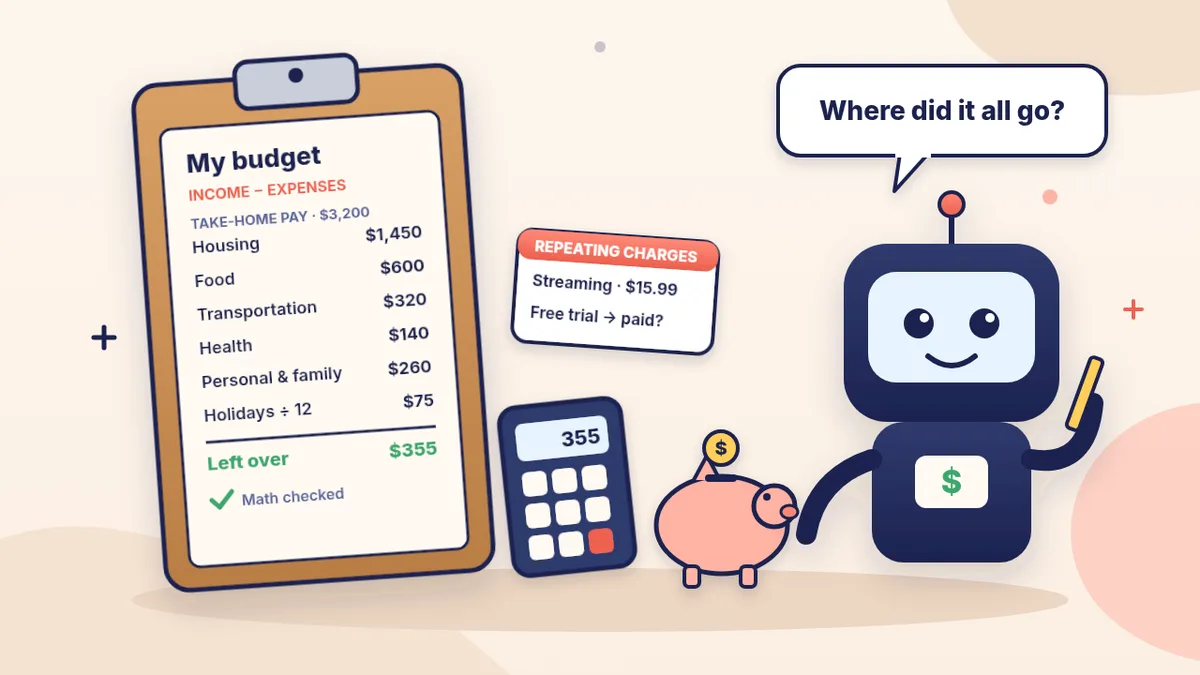
Ever looked at your balance and wondered where it all went? The FTC’s consumer.gov puts it simply: a budget helps you make sure you’ll have enough money every month, and without one you might run out before your next paycheck. The Consumer Financial Protection Bureau (CFPB) says getting started is often the hardest part. That’s where ChatGPT shines: you dump the messy version (“rent 1,450, phone like 85, groceries maybe 600?”) and it hands back a clean table with the subtraction done.
The 3-step method (from consumer.gov)
The FTC’s consumer.gov says to start by gathering your bills and pay stubs, then:
- List your bills and other expenses and the amounts. Bills are things like rent, electricity, water or phone. Expenses are things like food, gas, clothes and entertainment.
- Write down how much money you make each month (your income) from your pay stubs, plus any other money you get, like child support. Don’t get paid every month? consumer.gov says to add up all your income from last year and divide by 12 for a monthly estimate.
- Subtract your bills and expenses from your income. The number should be more than zero. If it’s less than zero, you’re spending more than you make, so look for things in your budget you can change.
The FTC’s free one-page Budget Worksheet (August 2024) uses these categories: housing, food, transportation, health, personal and family, school, and other (fees, debt payments, savings). Prompt #1 below asks ChatGPT to use the same ones, so your answer lines up with the printed sheet.
🧰 Want the shortcut? Get the Starter Kit ($29)
Everything from our guides in one download: a 2-minute “pick your assistant” chart, step-by-step setup checklists for ChatGPT Projects, Claude Projects and agent-style assistants, 24 copy-paste bot recipes (personal and small business), a safety and permissions checklist, and troubleshooting fixes. Includes a ZIP of every recipe as a ready-to-paste text file.
Get the Starter Kit: $29 See what’s inside →
One-time payment, secure checkout by Stripe, instant download page right after checkout.
Step 1: Gather your numbers (10 minutes)
You don’t need to be exact on day one. The CFPB suggests that if it feels overwhelming, start small: look at one week at a time by reviewing your receipts or your checking account. Grab:
- Pay stubs or deposit amounts (take-home pay, after taxes), plus benefits, child support or side income.
- This month’s bills: rent or mortgage, utilities, phone and internet, insurance, car payment, debt payments.
- Everyday spending: groceries, eating out, gas, rideshares, clothes, haircuts, subscriptions. Your banking app’s recent transactions help here.
3 copy-paste prompts to try today
1. 💵 My messy numbers → a one-page monthly budget
Help me make a simple monthly budget. Here are my numbers
(rough is fine): [TAKE-HOME PAY PER MONTH, OTHER INCOME,
AND EVERYTHING I SPEND, IN ANY ORDER].
1. Put them in a table using these categories: housing,
   food, transportation, health, personal and family,
   school, other (fees, debt payments, savings).
2. Show total income, total expenses, and income minus
   expenses. Show your math so I can check it.
3. If something looks missing (like car insurance or
   haircuts), list it with a [__] blank. Don't guess
   amounts.
4. No judgment, plain words, one page.
2. 📅 Find my once-a-year and holiday costs
Help me find the costs that DON'T come every month, so
they stop surprising me. Ask me about: car registration
and repairs, insurance paid yearly or every 6 months,
medical and eyeglasses, school costs, holiday gifts and
travel, birthdays, donations, and memberships that renew
once a year. Then make a table: item, about how much per
year, and per month (divided by 12). Add the monthly
total as one line I can put in my budget.
The CFPB says to look back over several months so you don’t miss less frequent expenses like insurance payments, medical costs, school clothes, gifts, charity and vacations, and to keep a “miscellaneous” line for surprises. With the holidays coming, prompt #2 is the one most people skip and most need.
3. 🔁 Spot repeating charges and forgotten subscriptions
Here are last month's transactions from my bank and card
app, with account numbers removed: [PASTE OR TYPE].
1. Group them into simple categories with totals.
2. List every charge that looks like it repeats
   (subscriptions, memberships, app stores, free trials
   that turned into paid ones), with the amount.
3. Point out any fees.
Don't tell me what to cancel. Just make the list so I
can decide.
The FTC says to watch your bank and card statements and mark your calendar before a free trial ends. To cancel, follow the company’s own cancellation steps and keep a copy of your request. If they keep charging you after you cancel, the FTC says to dispute the charge (a “chargeback”) with your card company.
🔒 Members-only
Members get the full pack: 12 more budgeting prompts + a fill-in “budget card”
Copy-paste prompts for the rest of the month: a bill-due-date calendar, a payday-by-payday plan for when bills and paychecks don’t line up, a budget for uneven or gig income, a holiday gift and travel budget, a list of your debts side by side, a grocery budget that ties into a meal plan, a “cut 10%” idea list, a savings goal plan, a friendly money talk with your partner or family, a call script to ask for a lower bill, a weekly 10-minute check-in, and an end-of-month review. Plus a fill-in budget card you can reuse every month.
Bot Club · $9/mo · cancel anytime. Your Member Library opens right after checkout.
Join Bot Club, unlock the full pack · $9/moStep 2: Check the math and make it real
- Add it up yourself. Run the totals on your phone’s calculator. If something is off, say: “Your total doesn’t match mine. Re-add the expenses line by line.”
- Compare with your bank. The CFPB says to check your bank statements: if what’s really left in your account each month doesn’t match what your budget says, look again at your spending.
- Write down what “is,” not what “should be.” The CFPB warns not to edit your budget to show what you “could” or “should” spend. Get the real picture first, then decide on changes.
- Make savings a bill. consumer.gov suggests you can make savings one of the expenses in your budget, even a small amount.
Step 3: Use it every month
consumer.gov says a budget is something you use every month: make a plan at the start of the month, write down what you spend each day, see at the end of the month whether you spent what you planned, and use that to plan next month. The CFPB adds a few tips for sticking with it:
- Make it easy to track. A daily note or a folder of receipts you review each week.
- Set a goal, small or large, and reward yourself for progress.
- Get support. Do it with someone you trust, or have them listen when it’s hard.
- Mind the timing. If you come up short at the end of the month, the CFPB says your bill dates and paydays may not match. Its bill calendar tool suggests marking mailed bills at least 7 days before they’re due and online or in-person payments 2 to 3 days before.
- Update it when your job or spending habits change.
Want ChatGPT to remind you? See ChatGPT scheduled tasks to get a bill-day or Sunday check-in reminder.
Watch out: subscription and renewal scams
- A renewal notice that asks for your card number? Stop. The FTC says if you already agreed to auto-renew, a renewal notice isn’t a bill, so it shouldn’t ask for your card information. A notice for a subscription you don’t have is probably from a scammer: don’t call the number on it or click its links.
- Check the price. The FTC says an automatic renewal might charge more than last time, especially after a promotional rate ends.
- “Free” trials that cost shipping aren’t really free, the FTC says, and can lead to bigger charges later. Report problems at ReportFraud.ftc.gov.
Privacy tips
- Numbers, not identities. Budgets only need amounts and categories. Leave out names, addresses, account and card numbers, and your Social Security number.
- Want it off your history? Use Temporary chat. OpenAI says a temporary chat stays out of your history and isn’t used to improve its models while it stays temporary, though a copy may be kept for up to 30 days for safety purposes.
- Want to keep coming back? Do the opposite: put your budget in a ChatGPT Project so each month’s check-in starts with last month’s numbers.
Troubleshooting
- The totals look wrong. Say: “Show the math line by line,” and check with a calculator.
- It started giving investing or loan advice. Say: “Don’t advise me. Just organize my numbers.”
- I don’t know an amount. Leave a [__] blank and track it for a week or two, like the CFPB suggests.
- My budget comes out below zero. That’s useful information, not failure. Use prompt #3 to spot repeating charges, and ask “List 10 small ideas to close a [AMOUNT] gap, easiest first.”
- It feels like too much. Do just prompt #1 today. That’s a real budget.
More help: AI for budgeting & bank questions has 5 more free prompts (money words explained, a fee refund request, comparing two offers). Got a confusing bill or letter? See understand bills, letters and forms with ChatGPT. Want to free up cash? Sell stuff you no longer need or plan cheaper dinners with the ChatGPT meal planner.
Why Bot Club is only $9 a month
This guide gives you the first three budgeting prompts free. Bot Club is for having the right prompt ready every week of the month: the 12 extra budgeting prompts (bill calendar, payday-by-payday plan, uneven income, holiday gift budget, debts side by side, grocery budget, “cut 10%” ideas, savings goal, a money talk, a lower-bill script, a weekly check-in and an end-of-month review) and the fill-in budget card above, plus every other members-only pack (bills and paperwork, doctor visits, emails, spreadsheets, listings and more) in one Member Library, and a new recipe each month. Cancel anytime from your Stripe receipt.
Want it done faster?
🧰 Starter Kit: $29
24 copy-paste bot recipes, setup checklists and a safety checklist, with a ZIP of every recipe as a text file.
Get the Starter Kit: $29🏆 Bot Club: $9/month
The 12 budgeting prompts and budget card above, every other members-only pack, and a new recipe every month. Cancel anytime.
Join Bot Club: $9/mo🛠️ Done-for-you setup
$199 setup + $49/month. Want an AI assistant set up for your business and tested on your real everyday tasks? We build it with you, then keep it tuned every month.
Get set up: $199Not sure which assistant fits you? Take the 2-minute AI sidekick quiz.
This guide is general information about organizing your own money, not financial, tax or legal advice.
Holiday dinner coming up? Learn to plan Thanksgiving dinner with ChatGPT within a budget, with a shopping list you can price out before you go.
Holiday gifts coming up? Turn your gift list into a per-person spending limit that fits this budget, and check deals before you pay, with holiday shopping with ChatGPT.
Buy your own health insurance? Your 2027 Marketplace savings are based on the income you expect next year, so the numbers in this budget help. Open Enrollment starts November 1; see HealthCare.gov Open Enrollment with ChatGPT.
Tax season is next. The same habit that keeps this budget going (one folder, a few minutes a month) makes taxes easier. IRS.gov says W-2s and 1099s usually arrive in January or February; build your checklist now with Get your tax papers ready with ChatGPT.
Budgeting for college costs? Our 2027–28 FAFSA with ChatGPT guide walks through the form calmly, with plain-English questions and aid offers explained.
Planning holiday giving? Put a giving line in your budget, then check a charity before you donate with ChatGPT. New for 2026: the IRS says people who don’t itemize may be able to deduct up to $1,000 of cash gifts to qualified charities ($2,000 married filing jointly).
Sources
- FTC consumer.gov: Making a Budget (August 2024; checked Oct 25, 2026)
- FTC consumer.gov: Budget Worksheet (August 2024; checked Oct 25, 2026)
- CFPB: Budgeting: How to create a budget and stick with it (checked Oct 25, 2026)
- CFPB: Assess your spending (checked Oct 25, 2026)
- CFPB Your Money, Your Goals: Bill calendar tool (PDF) (checked Oct 25, 2026)
- FTC: Getting in and out of free trials, auto-renewals and negative option subscriptions (checked Oct 25, 2026)
- OpenAI Help Center: Temporary chat in ChatGPT (checked Oct 25, 2026)
🎁 Free: 10 copy-paste ChatGPT prompts
If this guide helped, these two free meal-planning prompts pair well with it, with a Copy button:
- “Use up my fridge” dinners
- A “tight week” budget dinner plan
The pack also has 8 more copy-paste prompts from our other free guides (job search, meals, trips, study and small business).
Free with an email signup. We never sell your email.
Pick the easiest way to get going
Three simple options. Secure checkout by Stripe.
🧰 Starter Kit
- Pick-your-assistant chart
- Setup checklists
- 24 copy-paste bot recipes
- Safety checklist + troubleshooting
🏆 Bot Club
- New bot recipes every month
- Ready-made templates
- Monthly “get unstuck” Q&A in the members area
- Cancel anytime
🛠️ Done-for-you setup
- We set up your assistant with you
- Monthly tuning: fixes, updates
- New recipes as you go
📬 Get one fun bot trick every week
The Bot Whisperer newsletter: free, plain English, unsubscribe anytime.
Coming soon: sign-ups open shortly. Follow @teachbots to hear when they do.