🏆 Bot Club, $9/mo: new copy-paste bot recipes and ready-made templates every month, plus a monthly “get unstuck” Q&A post in the members area. Cancel anytime.
Join Bot ClubWhat Alexa+ is (in one minute)
Amazon calls Alexa+ its “next-generation assistant powered by generative AI.” It’s the same Alexa name and the same blue light, but it’s better at understanding what you mean, it can handle longer back-and-forth chats, and it can do more jobs for you. Amazon’s help page says Alexa+ can create smart home routines with just your voice, make restaurant reservations, help you discover new music, search for and buy things, and make suggestions based on your interests.
- Say “Alexa” just once. Amazon says that with Alexa+ you can keep the conversation going “as long as you see the blue light bar” without repeating the wake word, and jump from topic to topic.
- Share things for it to remember. Amazon says you can share documents, emails, photos and messages in the Alexa app, or by email to alexa@alexa.com, for Alexa to remember, summarize or act on. Its example: upload your HOA guidebook and ask later what fencing is allowed.
- Family helpers. Amazon describes turning a photo of a handwritten recipe into a clean recipe card, and pulling dates from a school flyer or an email invite into a shared calendar.
🧰 Want the shortcut? Get the Starter Kit ($29)
Everything from our guides in one download: a 2-minute “pick your assistant” chart, step-by-step setup checklists for ChatGPT Projects, Claude Projects and agent-style assistants, 24 copy-paste bot recipes (personal and small business), a safety and permissions checklist, and troubleshooting fixes. Includes a ZIP of every recipe as a ready-to-paste text file.
Get the Starter Kit: $29 See what’s inside →
One-time payment, secure checkout by Stripe, instant download page right after checkout.
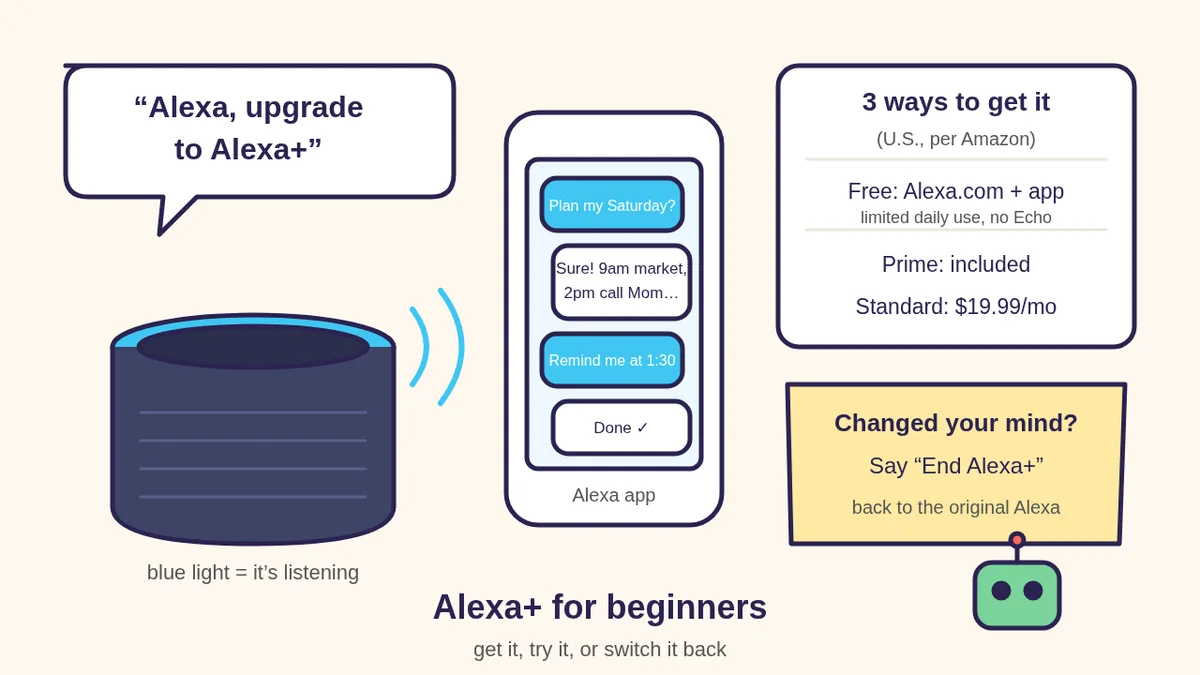
Is Alexa+ free? The 3 ways to get it
Here’s how Amazon lays it out for U.S. customers (checked Oct 30, 2026):
- Free ($0/month): a “focused” Alexa+ experience with limited daily usage on Alexa.com and in the Alexa app (Amazon’s plan page also lists Fire TV and Alexa Tablets). Amazon says usage limits refresh regularly, so each day may differ. There’s no free Alexa+ on Echo devices.
- Prime: Alexa+ is included with a Prime membership at no additional cost, for the whole household, on compatible Echo and Alexa devices, Alexa.com and the app.
- Standard ($19.99/month): full Alexa+ on your compatible devices without Prime’s other benefits.
Trials: Amazon says eligible non-Prime customers can try a 30-day free trial of Prime (with Alexa+ included) or a 30-day free trial of the Standard plan, and that non-Prime customers can try Alexa+ free for 90 days when they buy a device. Put a reminder on your calendar before any trial ends.
Step 1: Check that your account and Echo can use it
- Personal account only. Amazon says Alexa+ works only with personal Amazon accounts, not Amazon Business or Enterprise accounts, set to a supported location.
- Language. In the U.S., Amazon says Alexa+ works in English and Spanish. Your device language should be English (United States), Spanish (United States) or one of the bilingual settings.
- Very old Echos can’t use it. Amazon’s list of devices that will never get Alexa+: Echo (1st and 2nd Gen), Echo Dot (1st Gen), Echo Plus (1st Gen), Echo Buds (1st Gen), Echo Show (1st and 2nd Gen), Echo Spot (1st Gen), Amazon Tap, Fire TV devices on Fire OS 5, and Fire tablets on Fire OS 7 or earlier. Those keep working with the original Alexa.
- Gift device? Amazon says if Alexa+ came with a device purchase, it belongs to the Amazon account used to register that device.
- Still nothing? Amazon’s tip: say “Check for software updates.”
Step 2: Turn it on
- No Prime, just curious? Go to Alexa.com in a browser or open the Alexa app and start typing. That’s the free, limited version.
- Prime member with an Echo? Say “Alexa, upgrade to Alexa+” (Amazon’s help page also lists “Alexa, upgrade!”), or sign in at Alexa.com. Amazon notes that if you joined Prime somewhere other than an Alexa device, you may need to activate Alexa+ separately at amazon.com/alexaplus.
- Watch for the welcome. Amazon says you’ll get a phone notification and a welcome email. Then Alexa+ introduces itself, learns your name and interests, makes you a profile, helps you invite household members to make their own, and offers to recognize your voice. You can say no to anything you’re not comfortable with.
3 fun prompts to try first
Say these to an Echo after the blue light comes on, or type them in the Alexa app or at Alexa.com. Change the words in [BRACKETS].
1. 📅 “Untangle my day”
Phone-ok. Good for busy parents and anyone who keeps sticky notes everywhere:
Alexa, here's my day: [DOCTOR AT 2, PICK UP
MILK, CALL MY SISTER, WALK THE DOG]. Put it
in a sensible order, tell me if anything
clashes, and remind me 30 minutes before the
doctor.
2. 🍪 “Turn Grandma’s recipe into a card”
Phone-ok (Alexa app). Snap a photo of a handwritten recipe card, share it with Alexa in the app, then type:
Turn this recipe into a clean recipe card
with ingredients and numbered steps. Keep any
notes written in the margins. Then show me
the amounts doubled for [8] people.
3. 🎲 “Dinner-table trivia”
Great for a family night, or practicing back-and-forth without repeating the wake word:
Alexa, let's play a 5-question trivia game
about [NATIONAL PARKS / 80s MUSIC / OUR STATE].
Ask one question at a time, give me three
choices, and tell me a fun fact after each
answer. Keep score.
Alexa+ can be wrong. For anything about health, money or the law, check an official source or a real professional.
🔒 Members-only
Members get the full pack: 12 more Alexa+ prompts + a fill-in “Our House Alexa+ Rules” card
Copy-paste Alexa+ prompts for the whole household: a morning briefing, a weekly family calendar check, a shared shopping list that doesn’t buy anything, a medication-time reminder routine, a “where did I put it?” memory note, a smart-home bedtime routine, a grandparent-friendly “how do I…” helper, a homework explain-it-step-by-step helper, a price-watch that asks before buying, a privacy check-up, a Spanish practice chat and a kid-safe story time. Plus a fill-in Our House Alexa+ Rules card.
Bot Club · $9/mo · cancel anytime. Your Member Library opens right after checkout.
Join Bot Club, unlock the full pack · $9/moPrivacy: the switches that matter
- Wake word. Amazon says Echo devices are designed to listen only for the wake word (like “Alexa”), and no audio is stored or sent to the cloud until the device hears it or you press the button. When it’s sending audio, the light ring turns blue (or a blue bar appears on Echo Show). You can also turn on a short sound in the Alexa app settings that plays whenever audio goes to the cloud.
- Follow Up Mode is on with Alexa+. Amazon says joining Alexa+ turns on Follow Up Mode, so you can keep talking without repeating “Alexa” while the blue light shows. To turn it off, say “turn off Follow-Up Mode.”
- Mic-off button. Every Echo has a microphone button. Press it and the mics lose power and a red light comes on.
- See and delete what it saved. In the Alexa app go to More > Alexa Privacy, or visit amazon.com/
alexaprivacysettings . You can review and delete voice recordings, transcripts and typed requests, have them deleted automatically after 3 or 18 months, or choose to not save voice recordings (Amazon says voice ID then stops working). - Humans may review a little. Amazon says it uses Alexa interactions to improve its services and train its models, with people reviewing “an extremely small sample.” You can manage the use of your voice recordings in the same Alexa Privacy area.
- Typing at Alexa.com with the mic. Amazon says when you speak into the Alexa.com chat box, your audio is turned into text in the cloud and then automatically deleted.
- Kids. Amazon says parents can turn on Alexa+ Kids on Kids Edition Echo devices, or by making a child profile with parental consent.
Your Amazon account now runs your assistant, so protect it like your email. If you’re not sure how modern sign-ins work, read Passkeys explained.
How to go back to the original Alexa
- On an Echo: say “End Alexa+.” Amazon says your device goes back to the original Alexa with Follow Up Mode still on, so also say “turn off Follow-Up Mode” if you don’t want it.
- Prime members: Amazon says you can deactivate Alexa+ at alexaplus.com, and access ends right away.
- Standard plan: go to Your Memberships & Subscriptions on Amazon, find Alexa+ Standard and choose Cancel My Subscription. Amazon says you keep it until the end of the billing cycle.
- Household members can switch themselves off without changing the account holder’s plan, according to Amazon.
- The free chat at Alexa.com and in the app can’t be switched off, Amazon says. You just don’t have to use it.
Troubleshooting
- “Alexa says it can’t upgrade.” Check the old-device list above, make sure your Amazon account is a personal one, and say “Check for software updates.”
- “I have Prime but no Alexa+.” Amazon says Prime members who joined outside Alexa may need to activate it at amazon.com/alexaplus.
- “It hit a limit.” On the free plan, Amazon says daily usage is limited and resets regularly. Try again later, or decide if Prime or Standard is worth it for you.
- “It keeps listening after I’m done.” That’s Follow Up Mode. Say “turn off Follow-Up Mode,” or press the mic-off button.
- “I want a different assistant.” Alexa+ is best for your smart home, lists and Amazon stuff. For long writing help, try our ChatGPT voice mode guide or, on a Windows PC, Microsoft Copilot for beginners.
Why Bot Club is only $9 a month
This guide gives you the first three Alexa+ prompts free. Bot Club is for having the right words ready when you’re setting up the whole house: the 12 extra prompts above (a morning briefing, a family calendar check, a no-buying shopping list, a medication reminder, a “where did I put it?” note, a bedtime routine, a grandparent helper, step-by-step homework help, a price watch that asks first, a privacy check-up, Spanish practice and kid-safe story time) and the fill-in Our House Alexa+ Rules card, plus every other members-only pack in one Member Library, and a new recipe each month. Cancel anytime from your Stripe receipt.
Want it done faster?
🧰 Starter Kit: $29
24 copy-paste bot recipes, setup checklists and a safety checklist, with a ZIP of every recipe as a text file.
Get the Starter Kit: $29🏆 Bot Club: $9/month
The 12 Alexa+ prompts and Our House Alexa+ Rules card above, every other members-only pack, and a new recipe every month. Cancel anytime.
Join Bot Club: $9/mo🛠️ Done-for-you setup
$199 setup + $49/month. Want an AI assistant set up for your family or business and tested on your real everyday tasks? We build it with you, then keep it tuned every month.
Get set up: $199More voice-assistant help: ChatGPT voice mode for beginners, ChatGPT for seniors and Is my AI assistant safe?
Study Buddy Engineer is independent and is not affiliated with Amazon. Alexa, Echo, Prime and Fire TV are Amazon trademarks. Prices, plans, devices and menus can change, so always check Amazon’s official pages below.
Have an iPhone too? Apple’s Siri can hand questions to ChatGPT. See ChatGPT with Siri on iPhone to turn it on, try 8 fun phrases and control what gets shared.
Sources
- About Amazon: Alexa+ now available to everyone in the US, and free for Prime members (updated 09/01/26) (checked Oct 30, 2026)
- About Amazon: Here’s what Amazon’s new Alexa+ can do for you (checked Oct 30, 2026)
- Amazon: Alexa+ plans and FAQ (checked Oct 30, 2026)
- Amazon Customer Service: About Alexa+ (checked Oct 30, 2026)
- Amazon Customer Service: Activate and Set Up Alexa+ (checked Oct 30, 2026)
- Amazon Customer Service: Alexa+ Requirements (checked Oct 30, 2026)
- Amazon Customer Service: Compatibility of Alexa+ with Alexa Built-in Devices (checked Oct 30, 2026)
- Amazon Customer Service: Cancel Your Alexa+ Subscription (checked Oct 30, 2026)
- Amazon Customer Service: Alexa, Echo Devices, and Your Privacy (checked Oct 30, 2026)
Keep going: related guides
- ChatGPT voice mode for beginners
- Microsoft Copilot for beginners
- Passkeys explained
- Is my AI assistant safe?
🎁 Free: 10 copy-paste ChatGPT prompts
Ten short copy-paste prompts from our free guides, each with a Copy button:
- Reply to a customer review (good or bad)
- A week of social posts in 5 minutes
- Match your resume to one job posting
- Practice the interview out loud
- “Use up my fridge” dinners
- A “tight week” budget dinner plan
- Fill in your “trip card”
- Plan a road trip like a human
- “Explain it like I’m 10”
- “Grade my answer, don’t write it”
Free with an email signup. We never sell your email.
Pick the easiest way to get going
Three simple options. Secure checkout by Stripe.
🧰 Starter Kit
- Pick-your-assistant chart
- Setup checklists
- 24 copy-paste bot recipes
- Safety checklist + troubleshooting
🏆 Bot Club
- New bot recipes every month
- Ready-made templates
- Monthly “get unstuck” Q&A in the members area
- Cancel anytime
🛠️ Done-for-you setup
- We set up your assistant with you
- Monthly tuning: fixes, updates
- New recipes as you go
📬 Get one fun bot trick every week
The Bot Whisperer newsletter: free, plain English, unsubscribe anytime.
Coming soon: sign-ups open shortly. Follow @teachbots to hear when they do.